

Modern user experience is a baseline for desktop apps, and using web technologies for that helps teams ship their software faster.
In this article, we showcase an architecture of a C# desktop application with UI implemented in Angular. The application works offline and doesn’t require a local server.
Why web UI on desktop?
Web UI stacks have large, well-tested component ecosystems. Using Angular for a desktop UI lets you work on layouts, themes, and interaction logic with familiar tools, instead of re-implementing the same controls in a native UI framework.
It also simplifies code sharing. The same Angular app can run in a browser and inside a desktop host, which reduces duplication and keeps UI changes centralized. With the native window and system integration handled separately, the web layer remains portable while the desktop app integrates cleanly with each platform.
Web UI in a C# desktop app
This article builds a cross-platform Avalonia desktop app whose UI is a simple Angular-based preferences screen. The Angular web app is bundled into the desktop package, and the .NET side saves settings to a persistent storage.

The Angular UI running inside the Avalonia window.
The UI uses PrimeNG for ready-made Angular components, but any similar component library would work with this architecture.
When putting a web UI into a desktop shell, a few hurdles show up:
- You need a reliable web view component that keeps up with modern web standards.
- You need to load the web content without a server so the app stays self-contained.
- You need a way for JavaScript to talk to .NET, and vice versa.
In the following sections, we first set up the window and web view, then show how to load the Angular UI without a server, and finally connect JavaScript to .NET through an API defined with OpenAPI specification.
App window and web view
For the desktop shell, we use Avalonia to create the native window and layout, and embed the web UI into it using DotNetBrowser — a cross-platform, Chromium-based web view component:
<Window Width="1200" Height="800" Title="Angular Demo">
    <Grid>
        <app:BrowserView x:Name="BrowserView" />
    </Grid>
</Window>
In the code-behind, the window subscribes to lifecycle events and creates the browser when it opens:
public partial class MainWindow : Window
{
private const string Url = ResourceRequestHandler.Domain;

    public IBrowser? Browser { get; set; }
    public IServiceProvider? ServiceProvider { get; set; }

    public MainWindow()
    {
        InitializeComponent();
        Opened += OnOpened;
        Closed += OnClosed;
    }

    private async void OnOpened(object? sender, EventArgs e)
    {
        Browser = ServiceProvider
            .GetRequiredService<IEngineService>()
            .CreateBrowser();
        BrowserView.InitializeFrom(Browser);

        await Browser.Navigation.LoadUrl(Url);
    }

    private void OnClosed(object? sender, EventArgs e)
    {
        Browser?.Dispose();
    }
}
The engine itself is managed by an IEngineService, so the window only
asks for a new browser instance when it opens and disposes it when it
closes. This keeps engine lifetime and configuration in one place.
Loading web UI in a desktop app
Moving an Angular app into an embedded browser changes how it is loaded.
In production, the compiled and minified files are bundled with the
desktop app, not served from http://localhost in a regular browser
tab.
During development, however, you still want fast feedback from a dev server and hot reload.
In development, you can keep the usual Angular workflow: start ng serve and
load the dev URL so hot reload stays intact.
Loading web UI in production
In production, we do not want a dev server or any other HTTP server at
all. Instead, the embedded browser loads URLs with a custom protocol such
as dnb://internal.host/.
DotNetBrowser lets you intercept requests to that protocol and responds with data from embedded resources instead of going to the network. With this scheme handler in place, the Angular app is served entirely from inside the package:
var builder = new EngineOptions.Builder
{
    RenderingMode = RenderingMode.HardwareAccelerated
};
builder.Schemes.Add(Scheme.Create("dnb"), handler);private string ConvertToResourcePath(string url)
{
string path = url.Replace(Domain, string.Empty, StringComparison.Ordinal);
if (string.IsNullOrWhiteSpace(path) || path == "/")
{
path = "browser/index.html";
}
if (!path.StartsWith("browser/", StringComparison.OrdinalIgnoreCase))
{
path = $"browser/{path}";
}
return prefix + path.TrimStart('/').Replace("/", ".");
}With loading in place, the remaining step is to let the Angular exchange information speak with the .NET side.
Communication between web app and .NET
Just like any web UI, the Angular app needs a backend to talk to. That’s the .NET side of the application, which is responsible for business logic, while the web UI takes care of the user the interaction. The question is how to connect these two parts in a way that stays maintainable as the app evolves.
Direct bridge between JavaScript and .NET
The most obvious option is to expose .NET methods directly to JavaScript. DotNetBrowser supports this style. First, you define a C# class:
public class PrefsService
{
    private readonly PreferencesStore store;

    public PrefsService(PreferencesStore store)
    {
        this.store = store;
    }

    public void SetAccountEmail(string email)
    {
        var account = store.GetAccount();
        account.Email = email;
        store.SetAccount(account);
    }
}
Second, you mirror its shape in TypeScript:
declare class PrefsService {
  setAccountEmail(email: string): void;
}

declare const prefsService: PrefsService;
// ...
prefsService.setAccountEmail('john.doe@example.com');
And finally, you inject a C# object into the JavaScript world:
browser.InjectJsHandler = new Handler<InjectJsParameters>(p =>
{
    dynamic window = p.Frame.ExecuteJavaScript("window").Result;
    if (window != null)
    {
        window.prefsService = new PrefsService(store);
    }
});
For small projects, this works well: the bridge is straightforward and easy to reason about. As soon as the API grows beyond a handful of methods, though, you start duplicating the same contracts in C# and TypeScript and relying on manual discipline to keep them in sync.
To avoid this, the app treats the bridge as a small HTTP API instead of a collection of ad‑hoc calls and lets tooling generate the clients, which we describe in more detail in the OpenAPI-based API section.
OpenAPI
In this architecture, the contract between web and .NET is described once using OpenAPI. From the single specification, you generate strongly typed C# and TypeScript models and clients. Both sides use the same definitions and stay in sync as the API evolves.
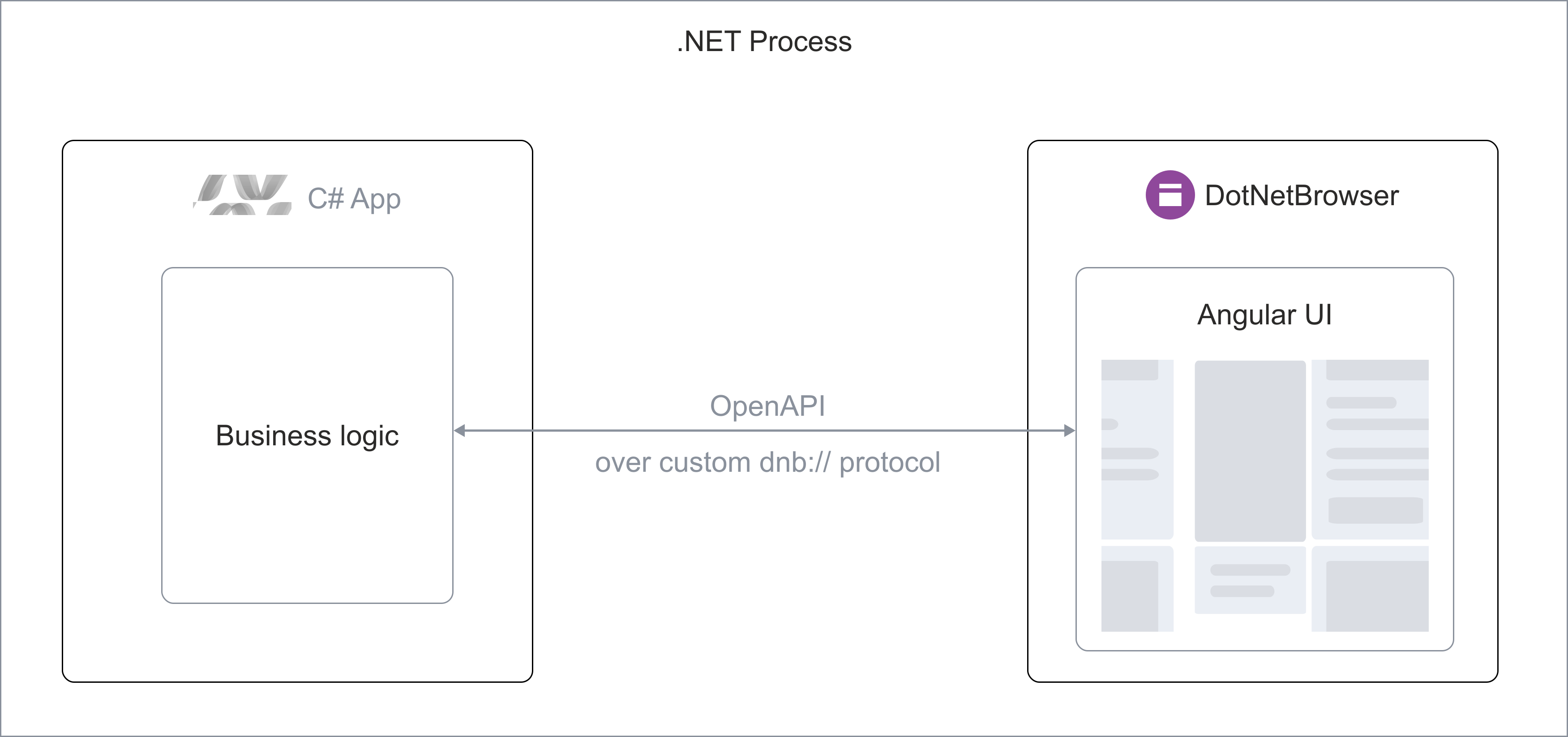
Communication protocol is defined using OpenAPI and doesn't require a server.
To handle API requets, we use the same dnb:/ scheme interceptor, that we use
to load the web page itself. That keeps the app self-contained and avoids
exposing a localhost port or remote endpoint that users could open in
a regular browser.
On the client side, the generated TypeScript service talks over the regular
fetch() API. That keeps the TypeScript code portable and compatible with
the regular browser environment.
OpenAPI contract at a glance
Here is a condensed version of the OpenAPI definition we use for the demo project:
paths:
  /account:
    get:
      responses:
        '200':
          content:
            application/json:
              schema:
                $ref: '#/components/schemas/Account'
    put:
      requestBody:
        required: true
        content:
          application/json:
            schema:
              $ref: '#/components/schemas/Account'
components:
  schemas:
    Account:
      type: object
      properties:
        email:
          type: string
        fullName:
          type: string
        twoFactorAuthentication:
          type: string
        biometricAuthentication:
          type: boolean
Here’s how the TypeScript code will use the auto-generated API client:
const account = await DefaultService.getAccount();

const next: Account = {
  ...account,
  email: 'john.doe@example.com',
};

await DefaultService.putAccount(next);
On the server side, the same OpenAPI definition backs the interceptor that
handles dnb://internal.host/api/* requests and routes them to the business
logic classes:
private InterceptRequestResponse HandleApiRequest(
    InterceptRequestParameters parameters,
    string path)
{
    return (method, trimmedPath) switch
    {
        ("GET", "account") => JsonResponse(parameters, store.GetAccount()),
        ("PUT", "account") =>
            HandlePut<Account>(parameters, a => store.SetAccount(a)),
        ("GET", "profile-picture") =>
            JsonResponse(parameters, store.GetProfilePicture()),
        ("PUT", "profile-picture") =>
            HandlePut<ProfilePicture>(
                parameters,
                pic => store.SetProfilePicture(pic)),
        _ => CreateResponse(parameters, HttpStatusCode.NotFound)
    };
}
That architecture ensures type-safe protocol, works offline, and stays compatible with a normal browser environment because it relies on regular HTTP semantics.
Conclusion
DotNetBrowser and Avalonia give you a native, cross-platform shell, while Angular and PrimeNG deliver a modern web UI. Serving the UI through a custom scheme keeps the app self-contained, and an OpenAPI contract lets JavaScript call into .NET over fetch without standing up another server.

Sending…
Sorry, the sending was interrupted
Please try again. If the issue persists, contact us at info@teamdev.com.
Your personal DotNetBrowser trial key and quick start guide will arrive in your Email Inbox in a few minutes.