Navigation
This guide describes the navigation events and shows how to load URLs and files, filter navigation requests, work with navigation history, and so on.
Loading URL
To navigate to a resource identified by a URL, use one of the following methods:
INavigation.LoadUrl(string url)INavigation.LoadUrl(LoadUrlParameters parameters)
Example below shows how to navigate to https://www.google.com using the INavigation.LoadUrl(string) method:
INavigation navigation = browser.Navigation;
navigation.LoadUrl("https://www.google.com");
Dim navigation As INavigation = browser.Navigation
navigation.LoadUrl("https://www.google.com")
Loading URL synchronously
The LoadUrl method sends a navigation request to the given resource and
returns a Task<NavigationResult> that completes when the navigation finishes,
whether the page loaded, failed, or was stopped. Check the
navigation result to find out which.
If you need to block the current thread execution until the navigation
finishes, use the Task.Wait() method:
navigation.LoadUrl("https://www.google.com").Wait();
navigation.LoadUrl("https://www.google.com").Wait()
This method blocks the current thread execution until the navigation finishes
or until the default 100 seconds timeout is reached. If the navigation does not
finish within this period, the task fails with TimeoutException. Wait()
throws it wrapped in AggregateException, while await throws it directly.
Navigation result
When the navigation finishes, the returned Task<NavigationResult> is
completed, even if the navigation failed. The NavigationResult.LoadResult
property tells how the navigation ended:
LoadResult.Completedmeans that the main frame fired the JavaScriptloadevent for the document that this navigation loaded, or that a same-document navigation, such as a jump to an anchor, finished.LoadResult.Failedmeans that the page did not load: a network error occurred, or Chromium showed its error page instead of the requested page.LoadResult.Stoppedmeans that loading was aborted, for example byStop()or by a new navigation, so the page can be partly loaded or not loaded at all.
The following code loads a page and checks the result:
NavigationResult result = await browser.Navigation.LoadUrl(url);
if (result.LoadResult != LoadResult.Completed)
{
    NetError? error = result.Error;
    // The page did not load, or loading was stopped.
    return;
}
Dim result As NavigationResult = Await browser.Navigation.LoadUrl(url)
If result.LoadResult <> LoadResult.Completed Then
    Dim [error] As NetError? = result.Error
    ' The page did not load, or loading was stopped.
    Return
End If
To find out why a navigation failed, check NavigationResult.Error. For
LoadResult.Failed, it usually contains the network error, such as
NetError.NameNotResolved; it is null, for example, when GoBack() has no
entry to navigate to. For LoadResult.Stopped, it is NetError.Aborted or
null.
LoadResult.Completed does not mean that the page is ready for your code. At
the load event, the HTML, styles, images, and the iframes that the page had
at that moment are loaded, but content that scripts load or render later can
still be missing. If the page then navigates itself, for example by setting
location.href or with <meta http-equiv="refresh">, a new document replaces
the one that the task reported. See
Waiting for page content.
An HTTP error is not a network error. When the server responds with a status
such as 404 or 500 and sends its own HTML page, the navigation completes with
LoadResult.Completed, and the NavigationFinished event reports
IsErrorPage as false. When the server sends such a status with an empty
body, Chromium shows its own error page instead, and the result is
LoadResult.Failed; see Custom error page.
NavigationResult does not contain the HTTP status code. To get it, use the
ResponseCode property of the main-frame NavigationFinished event.
The Reload(), GoBack(), GoForward(), and GoTo() methods, and
IFrame.LoadUrl(), also return Task<NavigationResult>. Their task is
completed by the first of the following that the frame reports after the call:
a finished or failed load, an error page, an aborted navigation, or a
same-document navigation. So a navigation that the page starts at the same
moment can complete it.
Loading URL with POST
To load a web page and send POST data, use the INavigation.LoadUrl(LoadUrlParameters) method. The following code demonstrates how send the plain text POST data to a URL:
navigation.LoadUrl(new LoadUrlParameters(url)
{
    UploadData = new TextData("post data"),
    HttpHeaders = new[]
    {
        new HttpHeader("header name", "header value")
    }
});
navigation.LoadUrl(New LoadUrlParameters(url) With {
    .UploadData = New TextData("post data"),
    .HttpHeaders =
    {
        New HttpHeader("header name", "header value")
    }
})
Besides the plain text data, you can send FormData, MultipartFormData or arbitrary BytesData:
MultipartFormData
var avatarFile = new FileValue("avatar", MimeType.ImagePng, avatarBytes);

var data = new MultipartFormData(new List<MultipartFormDataKeyValuePair>()
{
    new MultipartFormDataKeyValuePair("user", "john"),
    new MultipartFormDataKeyValuePair("avatar", avatarFile)
});
Dim avatarFile As New FileValue("avatar", MimeType.ImagePng, avatarBytes)

Dim data As New MultipartFormData(New List(Of MultipartFormDataKeyValuePair) From {
    New MultipartFormDataKeyValuePair("user", "john"),
    New MultipartFormDataKeyValuePair("avatar", avatarFile)
})
FormData
var data = new FormData(new List<KeyValuePair<string, string>>()
{
    new KeyValuePair<string, string>("street", "Forthlin Rd"),
    new KeyValuePair<string, string>("house", "20")
});
Dim data As New FormData(New List(Of KeyValuePair(Of String, String)) From {
    New KeyValuePair(Of String, String)("street", "Forthlin Rd"),
    New KeyValuePair(Of String, String)("house", "20")
})
ByteData
var avatar = new BytesData(byteArray);
Dim avatar As New BytesData(byteArray)
DotNetBrowser will automatically inject the Content-Type and Content-Length headers.
In the multipart case, it will also include the form boundary plus each part’s
Content-Disposition and Content-Type.
The default content types are:
text/plainforTextDataapplication/octet-streamforBytesDataapplication/x-www-form-urlencodedforFormDatamultipart/form-dataforMultipartFormData
If you need to override the default Content-Type or Content-Length headers, add your own values
as extra headers in LoadUrlParameters.
Loading a file
You can use the same methods to load HTML files from the local file system by providing an absolute path to the HTML file instead of an URL. See the code sample below:
navigation.LoadUrl(Path.GetFullPath("index.html"));
navigation.LoadUrl(Path.GetFullPath("index.html"))
Loading HTML
To load HTML into browser, you can create a data: encoded URI and then load it using the regular LoadUrl call. Here is an example:
var html = "<html><head></head><body><h1>Html Encoded in URL!</h1></body></html>";
var base64EncodedHtml = Convert.ToBase64String(Encoding.UTF8.GetBytes(html));
browser.Navigation.LoadUrl("data:text/html;base64," + base64EncodedHtml).Wait();
Dim html = "<html><head></head><body><h1>Html Encoded in URL!</h1></body></html>"
Dim base64EncodedHtml = Convert.ToBase64String(Encoding.UTF8.GetBytes(html))
browser.Navigation.LoadUrl("data:text/html;base64," & base64EncodedHtml).Wait()
Chromium limits data-encoded URIs to a maximum length of 2MB.
However, the base URL cannot be set when using this approach.
Another possible approach is to register a Scheme with a handler and intercept the corresponding request to provide the HTML. See the corresponding article.
Loading PDF files
When loading PDF files into the browser, use the PdfDocumentLoaded event to detect
when the document is loaded:
browser.PdfDocumentLoaded += (sender, args) =>
{
    var url = args.Url;
    var frame = args.Frame;

    // This event is a good place to start PDF printing.
    frame.Print();
};
AddHandler browser.PdfDocumentLoaded,
    Sub(sender, args)
        Dim url = args.Url
        Dim frame = args.Frame

        ' This event is a good place to start PDF printing.
        frame.Print()
    End Sub
The document may not be loaded because of an unexpected error: network failure, incorrect password,
corrupt PDF file, etc. In that case, DotNetBrowser will emit the PdfDocumentLoadFailed event:
browser.PdfDocumentLoadFailed += (sender, args) =>
{
    var url = args.Url;
    var frame = args.Frame;
};
AddHandler browser.PdfDocumentLoadFailed,
    Sub(sender, args)
        Dim url = args.Url
        Dim frame = args.Frame
    End Sub
Note that the Navigation.LoadUrl() task result and the FrameLoadFinished event should not be used to wait for a PDF document to load.
Reloading
There are several options to reload the currently loaded web page:
- Reload using HTTP cache:
navigation.Reload();
navigation.Reload()
- Reload ignoring HTTP cache:
navigation.ReloadIgnoringCache();
navigation.ReloadIgnoringCache()
- Reload using HTTP cache and check for repost:
navigation.ReloadAndCheckForRepost();
navigation.ReloadAndCheckForRepost()
- Reload ignoring HTTP cache and check for repost:
navigation.ReloadIgnoringCacheAndCheckForRepost();
navigation.ReloadIgnoringCacheAndCheckForRepost()
Stopping
Use the INavigation.Stop() method to cancel any pending navigation or download operation, and stop any dynamic page elements, such as background sounds and animations. See the code sample below:
navigation.Stop();
navigation.Stop()
Back & forward
DotNetBrowser allows working with the navigation back-forward history list.
When you create an IBrowser instance, it navigates to the about:blank web page by default. There is always one entry in the navigation back-forward list.
To load the previous location in the back-forward list, use the following approach:
if (navigation.CanGoBack()) {
    navigation.GoBack();
}
If navigation.CanGoBack() Then
    navigation.GoBack()
End If
To load the next location in the back-forward list, use the following approach:
if (navigation.CanGoForward()) {
    navigation.GoForward();
}
If navigation.CanGoForward() Then
    navigation.GoForward()
End If
To navigate to the entry at a specific index in the back-forward list, use the following approach:
if (index >=0 && index < navigation.EntryCount) {
    navigation.GoTo(index);
}
If index >=0 AndAlso index < navigation.EntryCount Then
    navigation.GoTo(index)
End If
To go through the back-forward list and get the details about every navigation entry, use the following approach:
for (int index = 0; index < navigation.EntryCount; index++) {
    INavigationEntry navigationEntry = navigation.EntryAt(index);
    Console.WriteLine("URL: " + navigationEntry.Url);
    Console.WriteLine("Title: " + navigationEntry.Title);
}
For index As Integer = 0 To navigation.EntryCount - 1
    Dim navigationEntry As INavigationEntry = navigation.EntryAt(index)
    Console.WriteLine("URL: " & navigationEntry.Url)
    Console.WriteLine("Title: " & navigationEntry.Title)
Next
To modify the back-forward list by removing the entries, use the following approach:
// Returns the number of entries in the back/forward list.
int entryCount = navigation.EntryCount;
// Remove navigation entries at index.
for (int i = entryCount - 2; i >= 0; i--) {
    bool success = navigation.RemoveEntryAt(i);
    Console.WriteLine("Navigation entry at index " + i +
            " has been removed successfully? " + success);
}
' Returns the number of entries in the back/forward list.
Dim entryCount As Integer = navigation.EntryCount
' Remove navigation entries at index.
For i As Integer = entryCount - 2 To 0 Step -1
    Dim success As Boolean = navigation.RemoveEntryAt(i)
    Console.WriteLine("Navigation entry at index " & i &
                      " has been removed successfully? " & success)
Next
Overscroll history navigation
In the hardware-accelerated rendering mode, DotNetBrowser allows navigating back/forward with a left/right swipe on devices with the touch screen. By default, the overscroll navigation is disabled. To enable it, use the IBrowserSettings.OverscrollHistoryNavigationEnabled property:
browser.Settings.OverscrollHistoryNavigationEnabled = true;
browser.Settings.OverscrollHistoryNavigationEnabled = True
Filtering URLs
You can decide whether navigation request to a specific URL is ignored.
See the code sample below showing how to ignore navigation requests to all URLs starting with https://www.google:
navigation.StartNavigationHandler =
    new Handler<StartNavigationParameters, StartNavigationResponse>((p) =>
    {
        // Ignore navigation requests to the URLs that start
        // with "https://www.google"
        if (p.Url.StartsWith("https://www.google"))
        {
            return StartNavigationResponse.Ignore();
        }
        return StartNavigationResponse.Start();
    });
navigation.StartNavigationHandler =
    New Handler(Of StartNavigationParameters, StartNavigationResponse)(Function(p)
        ' Ignore navigation requests to the URLs that start
        ' with "https://www.google".
        If p.Url.StartsWith("https://www.google") Then
            Return StartNavigationResponse.Ignore()
        End If
        Return StartNavigationResponse.Start()
    End Function)
Filtering resources
The SendUrlRequestHandler handler lets you determine whether the resources such as HTML, image, JavaScript or CSS file, favicon, and others are loaded. By default, all resources are loaded. To modify the default behavior, register your own handler implementation where you decide which resources are canceled or loaded.
See the code sample below showing how to suppress all images:
engine.Profiles.Default.Network.SendUrlRequestHandler =
    new Handler<SendUrlRequestParameters, SendUrlRequestResponse>(p =>
    {
        if (p.UrlRequest.ResourceType == ResourceType.Image)
        {
            return SendUrlRequestResponse.Cancel();
        }
        return SendUrlRequestResponse.Continue();
    });
engine.Profiles.Default.Network.SendUrlRequestHandler =
    New Handler(Of SendUrlRequestParameters, SendUrlRequestResponse)(Function(p)
        If p.UrlRequest.ResourceType = ResourceType.Image Then
            Return SendUrlRequestResponse.Cancel()
        End If
        Return SendUrlRequestResponse.Continue()
    End Function)
Navigation events
Loading a web page is a complex process where navigation events are fired. The following diagram shows the order of the navigation events that might be fired when loading a web page:
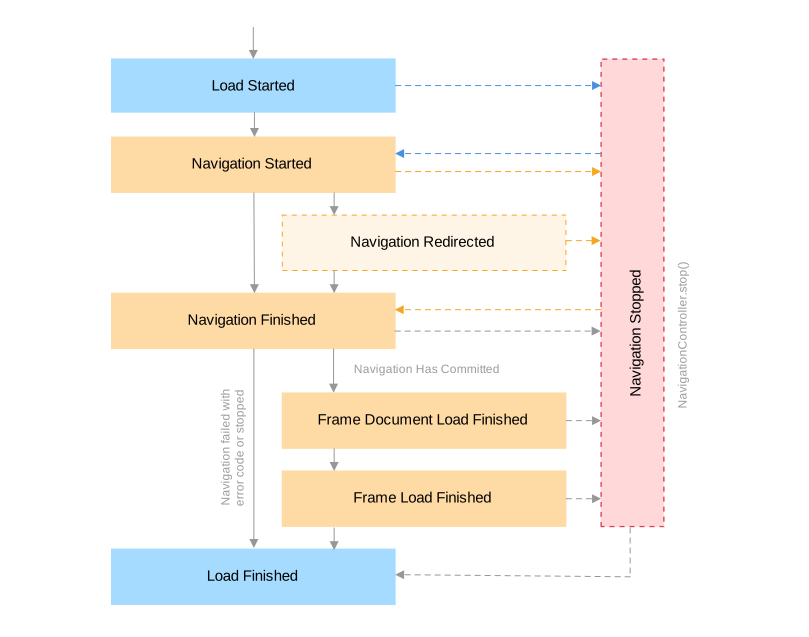
None of these events means that the page is ready for your code. They report different stages of loading, some of them for each frame, and some of them several times for one page. Use them as follows:
NavigationFinished: to check the result of a navigation, such as the HTTP status, an error page, or a redirect. The document can still be loading.FrameDocumentLoadFinished: when you need only the DOM tree.FrameLoadFinished: in the main frame, to work with the content that the page loads initially.LoadFinished: to update the UI, such as a loading indicator or the Stop button.
To wait until the content that you need is on the page, see Waiting for page content.
Navigation events are fired on background threads, one at a time for each event thread. Do not block their handlers: a slow handler delays the events that come after it. See Events.
Navigation event handlers can run in a different order than the loading
stages they report. For example, the FrameLoadFinished handler of a document
can run before its NavigationFinished or FrameDocumentLoadFinished handler.
The task returned by LoadUrl() can also complete before these handlers run.
Do not rely on their order.
Load started
To get notifications when content loading has started, use the LoadStarted event. See the code sample below:
navigation.LoadStarted += (s, e) => {};
AddHandler navigation.LoadStarted, Sub(s, e)
End Sub
This event corresponds to the moment when the spinner of the tab starts spinning.
Load finished
To get notifications when the browser stops loading content, use the LoadFinished event. For example:
navigation.LoadFinished += (s, e) => {};
AddHandler navigation.LoadFinished, Sub(s, e)
End Sub
This event corresponds to the moment when the spinner of the tab stops spinning.
The event reports the loading state of the whole browser, not of one page. It is fired again each time the browser starts and stops loading: for example, when an iframe loads, when the page navigates itself, or when a same-document navigation finishes. So one page can fire it several times. The event does not tell which URL or frame has loaded. Use it to update the UI, not to find out whether a page has loaded.
Load progress
The LoadProgressChanged event allows getting notifications about load progress:
navigation.LoadProgressChanged += (s, e) =>
{
    // The value indicating the loading progress of the web page.
    double progress = e.Progress;
};
AddHandler navigation.LoadProgressChanged, Sub(s, e)
    ' The value indicating the loading progress of the web page.
    Dim progress As Double = e.Progress
End Sub
Navigation started
To get notifications when navigation has started, use the NavigationStarted event. See the code sample below:
navigation.NavigationStarted += (s, e) =>
{
    string url = e.Url;
    // Indicates whether the navigation will be performed
    // in the scope of the same document.
    bool isSameDocument = e.IsSameDocument;
};
AddHandler navigation.NavigationStarted, Sub(s, e)
    Dim url As String = e.Url
    ' Indicates whether the navigation will be performed
    ' in the scope of the same document.
    Dim isSameDocument As Boolean = e.IsSameDocument
End Sub
Navigation stopped
To get notifications when navigation has stopped, use the NavigationStopped event. See the code sample below:
navigation.NavigationStopped += (s, e) => {};
AddHandler navigation.NavigationStopped, Sub(s, e)
End Sub
This event is fired when navigation is stopped using the Navigation.stop() method.
Navigation redirected
To get notifications when navigation has been redirected to a new URL, use the NavigationRedirected event. See the code sample below:
navigation.NavigationRedirected += (s, e) => {
    // The navigation redirect URL.
    string url = e.Url;
};
AddHandler navigation.NavigationRedirected, Sub(s, e)
    ' The navigation redirect URL.
    Dim url As String = e.Url
End Sub
Navigation finished
To get notifications when navigation has finished, use the NavigationFinished event. See the code sample below:
navigation.NavigationFinished += (s, e) => {
    string url = e.Url;
    IFrame frame = e.Frame;
    bool hasCommitted = e.HasCommitted;
    bool isSameDocument = e.IsSameDocument;
    bool isErrorPage = e.IsErrorPage;
    if (isErrorPage) {
        NetError error = e.ErrorCode;
    }
    // The HTTP status code, or 0 if there was no response with headers.
    int responseCode = e.ResponseCode;
    bool wasServerRedirect = e.WasServerRedirect;
};
AddHandler navigation.NavigationFinished, Sub(s, e)
    Dim url As String = e.Url
    Dim frame As IFrame = e.Frame
    Dim hasCommitted As Boolean = e.HasCommitted
    Dim isSameDocument As Boolean = e.IsSameDocument
    Dim isErrorPage As Boolean = e.IsErrorPage
    If isErrorPage Then
        Dim [error] As NetError = e.ErrorCode
    End If
    ' The HTTP status code, or 0 if there was no response with headers.
    Dim responseCode As Integer = e.ResponseCode
    Dim wasServerRedirect As Boolean = e.WasServerRedirect
End Sub
This event is fired for each navigation in each frame, when navigation is committed, aborted, or replaced by a new one. To know if the navigation has committed, use NavigationFinishedEventArgs.HasCommitted. To know if the navigation resulted in an error page, use NavigationFinishedEventArgs.IsErrorPage.
When a navigation commits a new document, that document starts loading. By the
time the handler runs, the document may have loaded or may still be loading,
so do not work with the DOM or run scripts that expect the page content in this
event. The Frame property is null when the navigation has not committed.
The event is fired by same-document (in the scope of the same document) navigations, such as fragment navigations or window.history.pushState()/window.history.replaceState(), which does not result in a document change. Use NavigationFinishedEventArgs.IsSameDocument property to check if it is a same-document navigation.
Frame load finished
To get notifications when content loading in the IFrame has finished, use the FrameLoadFinished event. See the code sample below:
navigation.FrameLoadFinished += (s, e) =>
{
    string url = e.ValidatedUrl;
    IFrame frame = e.Frame;
};
AddHandler navigation.FrameLoadFinished, Sub(s, e)
    Dim url As String = e.ValidatedUrl
    Dim frame As IFrame = e.Frame
End Sub
This event corresponds to the moment when the frame fires the JavaScript load
event: the document and its images, styles, and iframes have loaded. Keep in
mind:
- The event is fired for each frame. A page with three iframes fires it four
times, usually for the iframes first. Check
Frame.IsMainto find the main-frame event. - The main frame fires it again for each new document, for example when the
page navigates itself with JavaScript or
<meta http-equiv="refresh">, or after a form submission. The URL can stay the same. - Iframes that the page adds later fire their own events after the main-frame event.
- Same-document navigations do not fire this event.
- Content that scripts load or render after the
loadevent can still be missing. See Waiting for page content.
Frame load failed
To get notifications when content loading in the Frame has failed for some reason, use the FrameLoadFailed event. See the code sample below:
navigation.FrameLoadFailed += (s, e) =>
{
    string url = e.ValidatedUrl;
    NetError error = e.ErrorCode;
};
AddHandler navigation.FrameLoadFailed, Sub(s, e)
    Dim url As String = e.ValidatedUrl
    Dim [error] As NetError = e.ErrorCode
End Sub
Frame document load finished
To get notifications when the document loading in the Frame has finished, use the FrameDocumentLoadFinished event. See the code sample below:
navigation.FrameDocumentLoadFinished += (s, e) =>
{
    IFrame frame = e.Frame;
};
AddHandler navigation.FrameDocumentLoadFinished, Sub(s, e)
    Dim frame As IFrame = e.Frame
End Sub
At this point, deferred scripts were executed, and the content scripts marked document_end get injected into the frame.
The event corresponds to the JavaScript DOMContentLoaded event, which the
page reaches before the load event, so images and iframes can still be
loading. Its handler can still run after the FrameLoadFinished handler for
the same frame.
Tracking the navigation status
The following code checks whether the main frame committed the requested page without a Chromium error page or an HTTP error status. The document can still be loading at this moment:
navigation.NavigationFinished += (s, e) =>
{
    // Skip iframes, same-document navigations, and navigations without a frame.
    if (e.Frame == null || !e.Frame.IsMain || e.IsSameDocument)
    {
        return;
    }

    bool succeeded = e.HasCommitted && !e.IsErrorPage && e.ResponseCode < 400;
};
AddHandler navigation.NavigationFinished, Sub(s, e)
    ' Skip iframes, same-document navigations, and navigations without a frame.
    If e.Frame Is Nothing OrElse Not e.Frame.IsMain OrElse e.IsSameDocument Then
        Return
    End If

    Dim succeeded As Boolean =
        e.HasCommitted AndAlso Not e.IsErrorPage AndAlso e.ResponseCode < 400
End Sub
When you combine several navigation events to track the status, keep these rules in mind:
- A navigation that has not committed did not load the requested page. This
happens, for example, when the navigation is aborted or replaced by a new
one. Check
HasCommitted, not onlyIsErrorPage. - If
NavigationFinishedreportsIsErrorPageorFrameLoadFailedis fired for the main frame, treat the navigation as failed, even ifFrameLoadFinishedis fired too, before or after it. Chromium firesFrameLoadFinishedwhen its error page finishes loading. - Several navigations can run in the same frame at the same time, and the
events do not say which navigation they belong to. A late event of a previous
navigation can arrive after the next one has started. To get the result of a
navigation that your code starts, use the task returned by
LoadUrl(). ResponseCodeis0when the navigation did not produce a response with headers: for example, forabout:blank, for same-document navigations, and for network failures. A0on its own therefore means neither success nor failure.
Waiting for page content
No navigation event tells you that a page is ready for your code. Many pages
load or render their content with scripts after the load event, and some
pages navigate themselves right after loading. For such pages, wait until the
content that you need is on the page instead of waiting for an event.
One of the possible approaches is to inject JavaScript code that will notify
your application when the particular element appears. For example, the
following code waits until an element with the login-form ID appears in the
main frame. The JavaScript code checks for the element every 100
milliseconds for up to 30 seconds and returns a promise that is fulfilled when
the element is found; see Working with JavaScript Promises:
IJsPromise promise = await browser.MainFrame.ExecuteJavaScript<IJsPromise>(
    @"new Promise(resolve => {
          const deadline = Date.now() + 30000;
          const check = () => {
              if (document.getElementById('login-form')) {
                  resolve(true);
              } else if (Date.now() < deadline) {
                  setTimeout(check, 100);
              }
          };
          check();
      })");

var found = new TaskCompletionSource<bool>();
promise.Then(result => { found.TrySetResult(true); });

TimeSpan timeout = TimeSpan.FromSeconds(30);
if (await Task.WhenAny(found.Task, Task.Delay(timeout)) != found.Task)
{
    // The element did not appear in time, or the page navigated away.
}
Dim promise As IJsPromise =
    Await browser.MainFrame.ExecuteJavaScript(Of IJsPromise)(
        "new Promise(resolve => {" &
        "    const deadline = Date.now() + 30000;" &
        "    const check = () => {" &
        "        if (document.getElementById('login-form')) {" &
        "            resolve(true);" &
        "        } else if (Date.now() < deadline) {" &
        "            setTimeout(check, 100);" &
        "        }" &
        "    };" &
        "    check();" &
        "})")

Dim found As New TaskCompletionSource(Of Boolean)()
promise.Then(Sub(result) found.TrySetResult(True))

Dim timeout As TimeSpan = TimeSpan.FromSeconds(30)
If Await Task.WhenAny(found.Task, Task.Delay(timeout)) IsNot found.Task Then
    ' The element did not appear in time, or the page navigated away.
End If
Always use a timeout. If the page navigates to a new document while the code
waits, the promise is never fulfilled. If the page can do that, subscribe to
FrameLoadFinished before you start the check, and start the check again
each time the main frame loads a new document, within one overall timeout.
If the document changes before Then() is called, Then() throws
ObjectDisposedException; handle it like a timeout.
After a click or a form submission
When a click on a button or a form submission loads a new document, there is
no task to wait for. One of the possible approaches is to wait for the
FrameLoadFinished event of the main frame. Subscribe to it before you trigger
the navigation, so that you do not miss the event. For example:
IElement button = browser.MainFrame.Document.DocumentElement
                         .GetElementById("submit");

var loaded = new TaskCompletionSource<string>();
EventHandler<FrameLoadFinishedEventArgs> onLoaded = (s, e) =>
{
    if (e.Frame.IsMain)
    {
        loaded.TrySetResult(e.ValidatedUrl);
    }
};

browser.Navigation.FrameLoadFinished += onLoaded;
try
{
    button.Click();

    TimeSpan timeout = TimeSpan.FromSeconds(30);
    if (await Task.WhenAny(loaded.Task, Task.Delay(timeout)) != loaded.Task)
    {
        // The new page did not load in time.
    }
}
finally
{
    browser.Navigation.FrameLoadFinished -= onLoaded;
}
Dim button As IElement =
    browser.MainFrame.Document.DocumentElement.GetElementById("submit")

Dim loaded As New TaskCompletionSource(Of String)()
Dim onLoaded As EventHandler(Of FrameLoadFinishedEventArgs) =
    Sub(s, e)
        If e.Frame.IsMain Then
            loaded.TrySetResult(e.ValidatedUrl)
        End If
    End Sub

AddHandler browser.Navigation.FrameLoadFinished, onLoaded
Try
    button.Click()

    Dim timeout As TimeSpan = TimeSpan.FromSeconds(30)
    Dim first As Task = Await Task.WhenAny(loaded.Task, Task.Delay(timeout))
    If first IsNot loaded.Task Then
        ' The new page did not load in time.
    End If
Finally
    RemoveHandler browser.Navigation.FrameLoadFinished, onLoaded
End Try
The event only tells you that the main frame loaded a new document. It can also be an intermediate page of a redirect or a Chromium error page, so check the navigation status or the content that you expect before you use the page. If the new page loads its content with scripts or navigates itself, wait for the content after this, as shown above.
If the click updates the current document instead, for example in a
single-page application, no new document is loaded and FrameLoadFinished is
not fired. In this case, wait for the content that you expect directly, as
shown in the previous sample.
Common mistakes
- Treating
LoadFinishedas a sign that the page has loaded, or countingLoadFinishedevents. The event reports the loading state of the whole browser and can be fired several times for one page. - Handling
FrameLoadFinishedwithout checkingFrame.IsMain. The first event often comes from an iframe. - Working with the DOM in
NavigationFinished. The document can still be loading when the handler runs. - Relying on the order of navigation events. Their handlers can run in a different order than the loading stages they report.
- Using the frame or the DOM of an event after the page has moved on. By the
time the handler runs, the frame can show another document or be disposed,
and the DOM and JavaScript objects of the previous document are disposed, so
using them throws
ObjectDisposedException. CheckFrame.IsMainand the URL in the handler, and getDocumentagain when you need it. - Blocking in a navigation event handler, for example with
Task.Wait(),Task.Result, or a long DOM scan. It delays all the navigation events that come after it, and waiting in the handler for another navigation can end withTimeoutException. - Expecting as many events as in Chrome DevTools. DevTools shows the
loadevent of the main frame once, while DotNetBrowser reports each frame and each change of the loading state.
Custom error page
To override standard Chromium error pages, use ShowHttpErrorPageHandler and ShowNetErrorPageHandler handlers for HTTP (e.g. 404 Not Found) or network errors (e.g. ERR_CONNECTION_REFUSED) respectively. See examples below:
HTTP error page
browser.Navigation.ShowHttpErrorPageHandler =
    new Handler<ShowHttpErrorPageParameters, ShowHttpErrorPageResponse>(arg =>
    {
        string url = arg.Url;
        HttpStatusCode httpStatusCode = arg.HttpStatus;
        return ShowHttpErrorPageResponse.Show("HTTP Error web page:" + httpStatusCode);
    });
browser.Navigation.ShowHttpErrorPageHandler =
    New Handler(Of ShowHttpErrorPageParameters, ShowHttpErrorPageResponse)(Function(arg)
        Dim url As String = arg.Url
        Dim httpStatusCode As HttpStatusCode = arg.HttpStatus
        Return ShowHttpErrorPageResponse.Show("HTTP Error web page:" & httpStatusCode)
    End Function)
Network error page
browser.Navigation.ShowNetErrorPageHandler =
    new Handler<ShowNetErrorPageParameters, ShowNetErrorPageResponse>(arg =>
    {
        return ShowNetErrorPageResponse.Show("Network error web page");
    });
browser.Navigation.ShowNetErrorPageHandler =
    New Handler(Of ShowNetErrorPageParameters, ShowNetErrorPageResponse)(Function(arg)
        Return ShowNetErrorPageResponse.Show("Network error web page")
    End Function)
Custom error pages provided by the servers are not intercepted by these handlers and cannot be overridden using this functionality. The above handlers are invoked only for overriding the default Chromium error pages.