
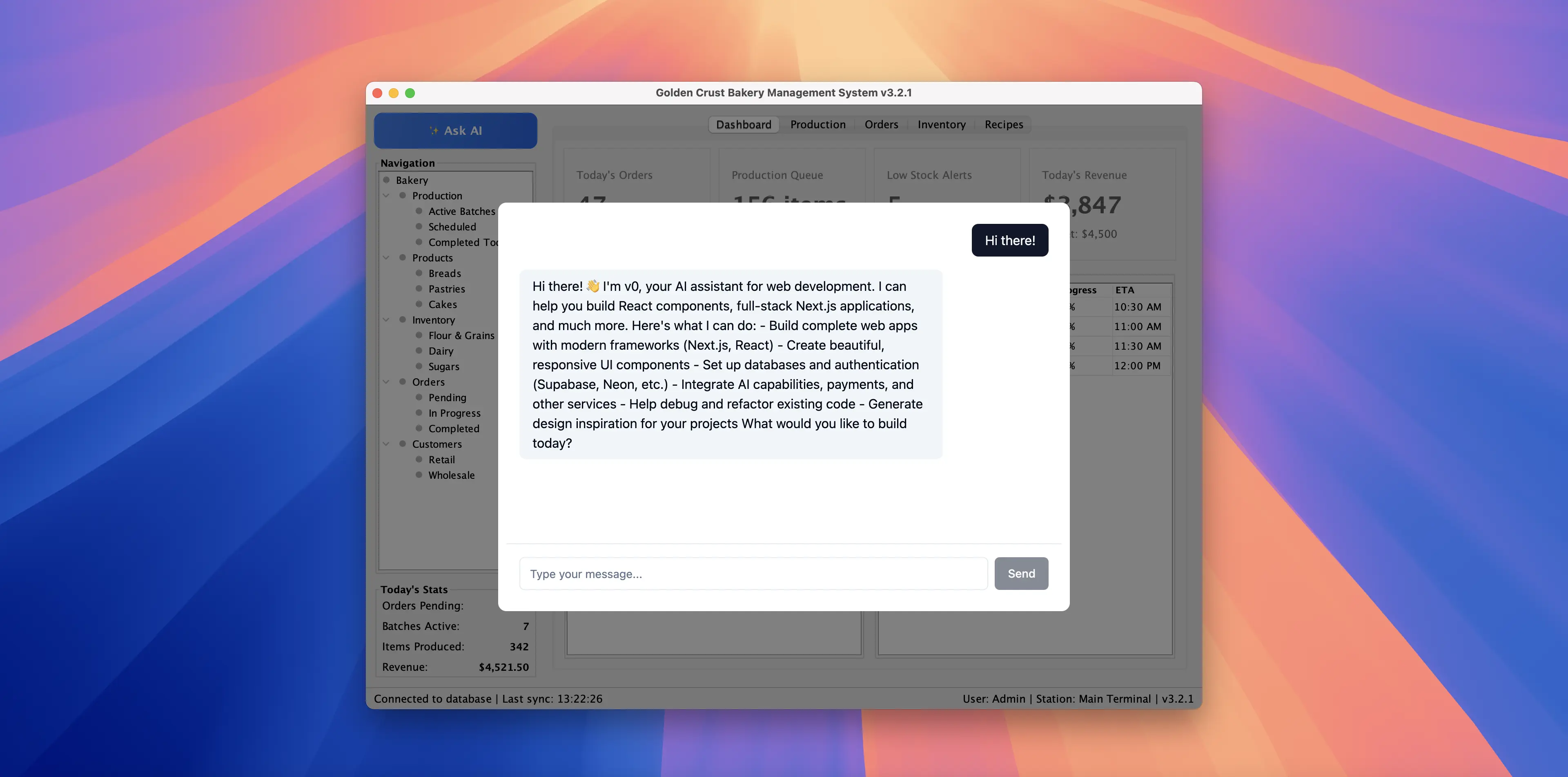
Desktop applications still handle critical workflows in many organizations. AI assistance is increasingly being added to these applications, but this creates a technical problem: web frameworks often make chat interfaces easy to build, but launching a separate browser forces users to switch between windows.
This technical case study describes the architecture we used to embed a web-based AI chatbot into an existing Java Swing application. The chatbot uses Vercel’s v0 SDK and runs inside the desktop window via JxBrowser.
AI chatbot embedded into a Java desktop application.
Requirements
We started with a Swing application with multiple tabs, a navigation tree, data tables, and forms. Our task was to add AI assistant functionality without rewriting the application.
Two constraints:
- The assistant must stay inside the application window. Users shouldn’t switch to a browser tab or external window.
- Access from anywhere in the app with a single click.
We could use web frameworks to build the chat UI, but launching a separate browser defeats the purpose of integrated AI.
Architecture
The solution has three layers. It includes a web application for the chat interface, a Swing layer that manages the overlay, and the web view component to integrate the web and Swing layers.
Chat application
The chat interface is built as a conventional web application. It uses React (a JavaScript UI framework) for the UI and Vercel’s v0 SDK for the AI chat functionality.
The web app doesn’t know it’s running inside a desktop app — from its perspective, it’s just being loaded in a browser. This separation allows you to develop and test the chat interface using standard web development tools without touching any Java code.
Swing application
To display the AI assistant, we add components to the existing Swing application. When the user clicks the “Ask AI” button, an overlay appears on top of the existing interface. This overlay contains the browser that loads the chat web app.
The overlay uses a glass pane — a Swing component that sits on top of the entire window to intercept events and draw over existing content.
The overlay consists of:
- A semi-transparent background that dims the existing interface.
- A centered browser view that displays the chat application.
- Fade animations and click-outside-to-dismiss behavior.
The overlay fades in on click. Clicking outside the browser dismisses it.
Web view layer
JxBrowser provides the embedded Chromium view inside Swing. In our implementation, we:
- Create a browser instance for the overlay.
- Load the web app when the overlay appears.
Integration with v0 SDK
Vercel’s v0 SDK reduces the amount of AI infrastructure work you need to build and maintain yourself. In this section, we demonstrate how little of actual code is required to get started.
First, initialize the v0 SDK client with your API key:
import { createClient } from "v0-sdk"

const v0 = createClient({ apiKey: "<V0_API_KEY>" })
When the user sends a message, call the v0 API and get the response:
const chat = await v0.chats.create({ message: userInput })
const aiResponse =
  chat.messages[chat.messages.length - 1].content
In a minimal setup, that’s the core request/response call. In production, you still want error handling, authentication, retries or rate limiting, etc.
The UI displays the conversation and provides an input field:
<div>
  <ScrollArea>
    {messages.map((message) => (
      <div>
        {message.content}
      </div>
    ))}
  </ScrollArea>

  <div>
    <Input
      value={input}
      onChange={(e) =>
        setInput(e.target.value)
      }
      disabled={isLoading}
    />
    <Button onClick={handleSend}>Send</Button>
  </div>
</div>
Conclusion
Adding AI to a desktop application sounds complex — you need a chat interface, AI integration, and a way to embed it into existing software without disrupting users. In our case, the solution was straightforward and relatively quick to implement.
Three decisions made this approach practical:
Minimal changes to the Swing application.
We added an overlay with a glass pane and a browser container. Most existing UI code remained untouched. No large architectural changes, no risky refactoring.
Embedding with JxBrowser.
It provided an embedded Chromium view for Swing and the building blocks to run the chat UI inside the desktop window.
Chat calls with v0 SDK.
It reduced the amount of AI-specific code we had to write to send messages and render responses, so we could focus on the UI and desktop integration.
This approach works for more than AI assistants. Any web-based functionality — dashboards, documentation, reports, visualizations — can be embedded into desktop applications the same way.

Sending…
Sorry, the sending was interrupted
Please try again. If the issue persists, contact us at info@teamdev.com.
Your personal JxBrowser trial key and quick start guide will arrive in your Email Inbox in a few minutes.