
Spring is usually associated with server-side Java. That does not mean it has to stay there. A desktop application can also benefit from dependency injection, configuration, profiles, data access, and the familiar service layer that Spring gives to backend projects.
In this article, we show how to combine Spring Boot, Vue, and JxBrowser in one Java desktop application.
The application uses Spring Boot for business logic and local HTTP
endpoints. It uses Vue for the user interface. JxBrowser provides
a Chromium-based BrowserView that renders the Vue application inside
the Swing window.
Requirements
- Java 17 or later.
- Node.js and npm for building the Vue application.
- A JxBrowser license key or evaluation key.
- Gradle Kotlin DSL for the Java build.
Application shape
The application has three parts:
- Spring Boot starts in the same Java process as the desktop app. It owns configuration, services, and REST endpoints.
- Vue is a regular Vue 3 and Vite application. It handles layout, interaction, and charts.
- JxBrowser provides the Chromium-based
BrowserViewembedded into the Swing window.
The result is a Java desktop app with a web-based dashboard inside a native window.
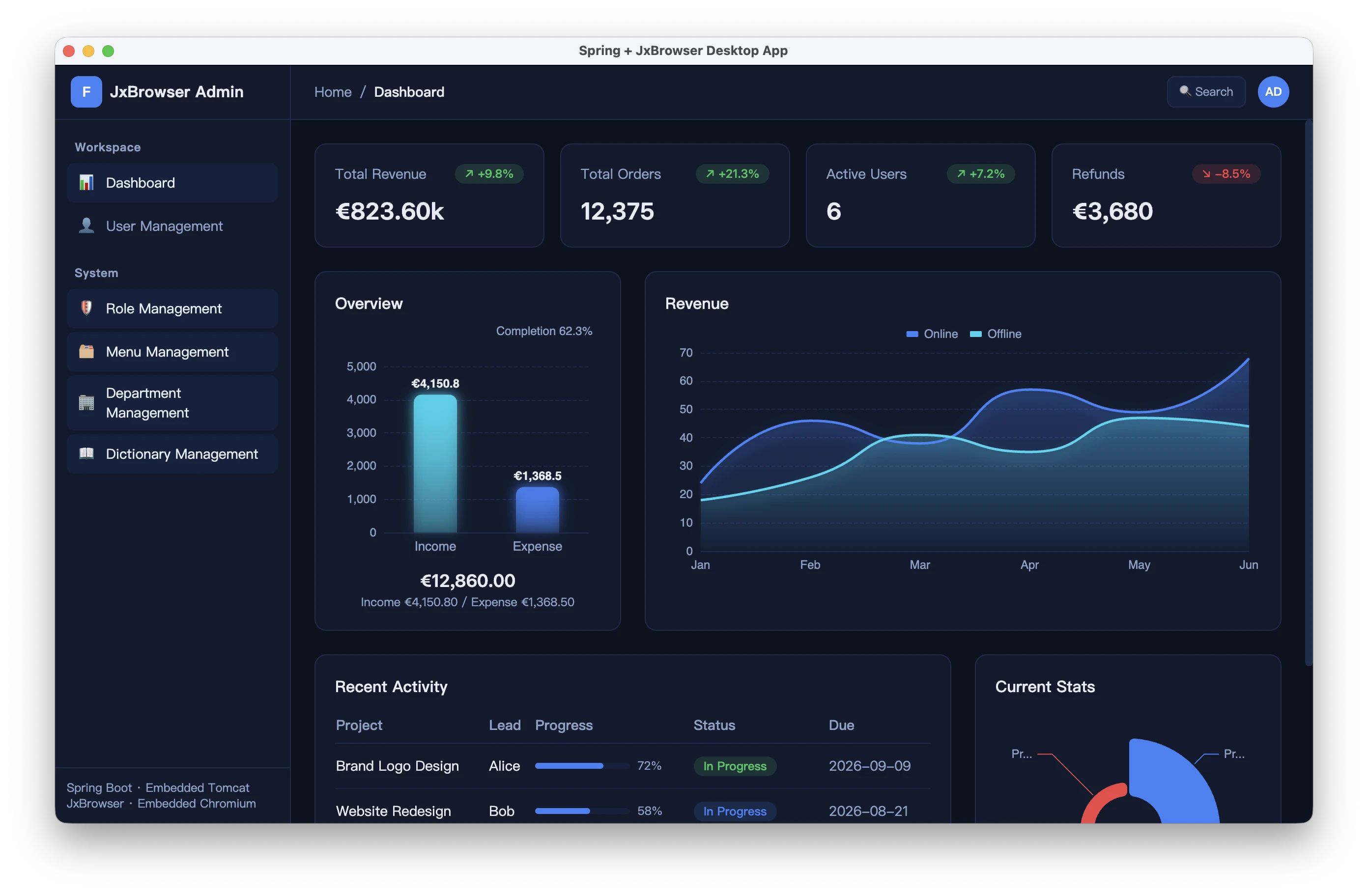
Admin dashboard in a Java desktop window.
A compact project layout can look like this:
spring-jxbrowser-desktop/
├── build.gradle.kts
├── src/main/java/com/example/desktop/
│   ├── DesktopApplication.java
│   ├── dashboard/
│   │   ├── DashboardController.java
│   │   └── DashboardService.java
│   └── user/
│       ├── UserController.java
│       └── UserService.java
├── src/main/resources/
│   ├── application.yml
│   └── static/
└── web-app/
    ├── package.json
    ├── vite.config.ts
    └── src/
The main flow is straightforward:
- Spring Boot starts with an embedded web server on
127.0.0.1. - The application reads the actual local port assigned to the server.
- Swing opens the desktop window.
- JxBrowser loads the Vue UI from the local Spring Boot server.
- Vue calls the local Spring API with standard
fetch().
Configure the build
The article uses Gradle Kotlin DSL. In build.gradle.kts, apply
the JxBrowser Gradle plugin and add the current-platform and Swing
dependencies:
plugins {
    java
    application
    id("org.springframework.boot") version "4.1.0"
    id("com.teamdev.jxbrowser") version "2.0.0"
}

jxbrowser {
    version = "9.5.3"
}

repositories {
    mavenCentral()
}

dependencies {
    implementation("org.springframework.boot:spring-boot-starter-web")
    implementation(jxbrowser.currentPlatform)
    implementation(jxbrowser.swing)
}

application {
    mainClass.set("com.example.desktop.DesktopApplication")
}

tasks.withType<JavaExec> {
    systemProperties(
        System.getProperties().mapKeys { it.key as String }
    )
    jvmArgs("--add-opens=java.desktop/java.awt=ALL-UNNAMED")
}
The jxbrowser.currentPlatform dependency adds Chromium binaries for
the platform where the build runs. For deployment builds, add
the platform-specific JxBrowser dependencies required by the operating
systems you distribute to.
Start Spring
The entry point is a regular Spring Boot application.
The important desktop detail is headless(false). Spring Boot applications
often run without a graphical environment, but a Swing application
needs access to AWT.
import org.springframework.boot.autoconfigure.SpringBootApplication;
import org.springframework.boot.builder.SpringApplicationBuilder;
import org.springframework.boot.web.context.WebServerApplicationContext;

@SpringBootApplication
public final class DesktopApplication {

    public static void main(String[] args) {
        var context = new SpringApplicationBuilder(DesktopApplication.class)
                .headless(false)
                .run(args);

        var port = ((WebServerApplicationContext) context)
                .getWebServer()
                .getPort();
        var appUrl = "http://127.0.0.1:" + port + "/";

        DesktopWindow.open(context, appUrl);
    }
}
Configure the embedded server to use a random local port:
server:
  port: 0
  address: 127.0.0.1
port: 0 asks the operating system to choose a free port. Binding to
127.0.0.1 keeps the server off the local network. It does not stop
other processes on the same machine from sending requests, so production
apps should add a startup-generated local token or another local
authorization check.
Open the window
The Swing window owns the visible desktop UI. JxBrowser owns the Chromium engine and the browser instance loaded into that window.
import static com.teamdev.jxbrowser.engine.RenderingMode.HARDWARE_ACCELERATED;

import com.teamdev.jxbrowser.engine.Engine;
import com.teamdev.jxbrowser.view.swing.BrowserView;
import java.awt.BorderLayout;
import java.awt.event.WindowAdapter;
import java.awt.event.WindowEvent;
import javax.swing.JFrame;
import javax.swing.SwingUtilities;
import javax.swing.WindowConstants;
import org.springframework.context.ConfigurableApplicationContext;

public final class DesktopWindow {

    public static void open(ConfigurableApplicationContext context,
                            String appUrl) {
        var engine = Engine.newInstance(HARDWARE_ACCELERATED);
        var browser = engine.newBrowser();

        SwingUtilities.invokeLater(() -> {
            var view = BrowserView.newInstance(browser);
            var frame = new JFrame("Spring and JxBrowser Desktop App");

            frame.addWindowListener(new WindowAdapter() {
                @Override
                public void windowClosing(WindowEvent event) {
                    engine.close();
                    context.close();
                }
            });

            frame.setDefaultCloseOperation(WindowConstants.DISPOSE_ON_CLOSE);
            frame.add(view, BorderLayout.CENTER);
            frame.setSize(1280, 800);
            frame.setLocationRelativeTo(null);
            frame.setVisible(true);

            browser.navigation().loadUrl(appUrl);
        });
    }
}
At this point the Java process starts Spring Boot, opens a Swing window, and loads the web UI through JxBrowser.
Serve the UI
The Vue application is a normal Vite project. During production builds, Vite writes its output into Spring Boot’s static resources directory:
import { fileURLToPath, URL } from 'node:url'
import { defineConfig } from 'vite'
import vue from '@vitejs/plugin-vue'

export default defineConfig({
  plugins: [vue()],
  base: './',
  build: {
    outDir: fileURLToPath(
      new URL('../src/main/resources/static', import.meta.url),
    ),
    emptyOutDir: true,
  },
})
Run the frontend build from web-app/:
npm run build
After that, start the Java application from the project root:
./gradlew run -Djxbrowser.license.key=<your_license_key>
Spring Boot serves the compiled Vue files from src/main/resources/static.
JxBrowser loads the generated page from the local Spring Boot URL.
The page can load at this point, but it still needs data. Next, we add the Spring endpoint that the Vue app calls.
Add REST endpoints
The dashboard can use ordinary Spring MVC endpoints. For example, a controller can return summary data for the page:
import java.util.Map;
import org.springframework.web.bind.annotation.GetMapping;
import org.springframework.web.bind.annotation.RequestMapping;
import org.springframework.web.bind.annotation.RestController;

@RestController
@RequestMapping("/api/dashboard")
public final class DashboardController {

    private final DashboardService dashboardService;

    public DashboardController(DashboardService dashboardService) {
        this.dashboardService = dashboardService;
    }

    @GetMapping("/summary")
    public Map<String, Object> summary() {
        return Map.of(
                "statCards", dashboardService.statCards(),
                "revenueChart", dashboardService.revenueChart());
    }
}
DashboardService is a normal Spring bean. In a real application, it
can call Spring Data repositories, a local database, files, or internal
systems.
The Vue side does not need a custom transport layer for this setup:
export async function fetchSummary(): Promise<DashboardSummary> {
  const response = await fetch('/api/dashboard/summary')

  if (!response.ok) {
    throw new Error(`Failed to load dashboard data: ${response.status}`)
  }

  return response.json()
}
Because the page and the API come from the same local Spring Boot
server, the frontend can use relative URLs such as
/api/dashboard/summary.
Local server trade-offs
The embedded-server approach is easy to reason about. It uses standard Spring MVC controllers, standard browser requests, and ordinary frontend code.
It also means the application starts a local HTTP server. Binding it
to 127.0.0.1 avoids exposing it to the network, but other local processes
can still attempt requests. For internal desktop applications, a random
port plus a local authorization check, such as a token generated when
the app starts and required on each local API request, can be
a reasonable baseline when the local API does not expose high-risk
operations. For applications with stricter local attack assumptions, avoid HTTP
for the internal UI-to-Java boundary.
Without local HTTP
JxBrowser also supports a different architecture: load the frontend through a custom scheme and call Java from JavaScript through the JavaScript-Java bridge. Use this when the desktop app should not start a local HTTP server.
In that setup, Spring Boot runs without the embedded web server:
var context = new SpringApplicationBuilder(DesktopApplication.class)
        .web(WebApplicationType.NONE)
        .headless(false)
        .run(args);
The application registers a custom scheme before creating the engine:
import static com.teamdev.jxbrowser.engine.RenderingMode.HARDWARE_ACCELERATED;

import com.teamdev.jxbrowser.engine.Engine;
import com.teamdev.jxbrowser.engine.EngineOptions;
import com.teamdev.jxbrowser.net.Scheme;

var domainToResourceInterceptor =
        new DomainToResourceInterceptor("desktop", "static");

var options = EngineOptions.newBuilder(HARDWARE_ACCELERATED)
        .addScheme(Scheme.of("app"), domainToResourceInterceptor)
        .build();
var engine = Engine.newInstance(options);
The domainToResourceInterceptor variable can be an instance of
DomainToResourceInterceptor from the JxBrowser local-content tutorial.
This class extends DomainContentInterceptor and loads HTML, CSS, and
JavaScript files from application resources through the class loader.
The full implementation is shown in
the loading local content tutorial. Once
the scheme is registered, the browser can load the UI from
an application-owned URL:
browser.navigation().loadUrl("app://desktop/");
The frontend can then call a Spring bean through a bridge object
injected into the JavaScript window:
import com.fasterxml.jackson.core.JsonProcessingException;
import com.fasterxml.jackson.databind.ObjectMapper;
import com.teamdev.jxbrowser.js.JsAccessible;
import org.springframework.stereotype.Component;

@Component
@JsAccessible
public final class SpringBridge {

    private final UserService userService;
    private final ObjectMapper json;

    public SpringBridge(UserService userService, ObjectMapper json) {
        this.userService = userService;
        this.json = json;
    }

    public String listUsersJson() throws JsonProcessingException {
        return json.writeValueAsString(userService.findAll());
    }
}
Inject that bean before page scripts run:
import com.teamdev.jxbrowser.browser.callback.InjectJsCallback;
import com.teamdev.jxbrowser.js.JsObject;

var bridge = context.getBean(SpringBridge.class);

browser.set(InjectJsCallback.class, params -> {
    JsObject window = params.frame().executeJavaScript("window");
    window.putProperty("springBridge", bridge);
    return InjectJsCallback.Response.proceed();
});
On the Vue side, the bridge looks like a JavaScript object:
declare const springBridge: {
  listUsersJson(): string
}

const users = JSON.parse(springBridge.listUsersJson())
This avoids a local HTTP server, but it gives up the simplicity of ordinary REST calls. Choose it when that trade-off matters.
Conclusion
Spring Boot can be useful in a desktop application when the project already needs configuration, dependency injection, services, and data access. JxBrowser covers the other side of the architecture: it embeds a Chromium-based web view into a Java desktop window, so the UI can be built with web technologies.
The simplest version is to let Spring Boot serve the Vue build output and REST endpoints on a random loopback port. If starting a local HTTP server is not acceptable, JxBrowser’s custom scheme support and JavaScript-Java bridge give you an alternative that avoids a local HTTP server.

Sending…
Sorry, the sending was interrupted
Please try again. If the issue persists, contact us at info@teamdev.com.
Your personal JxBrowser trial key and quick start guide will arrive in your Email Inbox in a few minutes.