Loading local content
This guide shows how to load local content by intercepting network requests and generating the response at runtime.
Prerequisites
To go through this tutorial you will need:
- Git.
- Java 17 or higher.
- A valid JxBrowser license. It can be either Evaluation or Commercial. For more information on licensing please see the licensing guide.
Setting up a project
The code of the example application for this tutorial is available along with other examples from a GitHub repository as a Gradle-based project.
If you want to build a Maven-based project, please refer to the Maven config guide. If you would like to build a Gradle-based project from scratch, please see the Gradle config guide.
Getting the code
To get the code please execute the following commands:
$ git clone https://github.com/TeamDev-IP/JxBrowser-Examples
$ cd JxBrowser-Examples/tutorials/serve-from-directory
Adding the license
To run this tutorial you need to set up a license key.
What you will build
In this tutorial, you will create a small application that serves files from a local directory when the browser loads a specific URL.
Instead of starting an HTTP server, you will:
- Intercept HTTP requests for a custom URL, such as
https://mydomain.com. - Map the requested path to a file under a local directory.
- Read the file and send it back as an HTTP response.
Implementing the base interceptor
Intercepting requests for a single domain
To serve local files, you’ll use JxBrowser’s custom scheme request interceptors.
An interceptor implements the InterceptUrlRequestCallback interface and gets
invoked for each outgoing request, optionally replacing the default network behavior
with a custom response.
Start by creating a base interceptor:
import com.teamdev.jxbrowser.net.callback.InterceptUrlRequestCallback;
...

abstract class DomainContentInterceptor implements InterceptUrlRequestCallback {

    private final String domain;

    DomainContentInterceptor(String domain) {
        this.domain = domain;
    }

    @Override
    public Response on(Params params) {
        // The request will be handled here.
        // For now, allow the request to go through the network.
        return Response.proceed();
    }

    /**
     * Resolves the requested {@code path} to a file and opens it.
     */
    protected abstract InputStream openContent(String path) throws IOException;
}
This skeleton declares the base class, remembers the domain, and defines the
openContent(String) method that subclasses will use to supply the response
body.
Next, update the on(Params params) method so that it filters requests by
domain:
@Override
public Response on(Params params) {
    var uri = URI.create(params.urlRequest().url());
    if (!uri.getHost().equals(domain)) {
        // Let Chromium process requests to other domains as usual.
        return Response.proceed();
    }
    // We will handle requests to mydomain.com here.
    return Response.proceed();
}
Next, add logic that reads the content using the abstract openContent(String) method and returns
it as an HTTP response. For now, assume that the content always exists:
import com.teamdev.jxbrowser.net.UrlRequestJob;
import static com.teamdev.jxbrowser.net.HttpStatus.OK;
...

@Override
public Response on(Params params) {
    ...
    // Skip the leading slash.
    var path = uri.getPath().substring(1);
    try (var content = openContent(path)) {
        var job = createJob(params, OK);
        writeToJob(content, job);
        job.complete();
        return Response.intercept(job);
    } catch (Exception e) {
        // For now, let Chromium handle the request as usual.
        return Response.proceed();
    }
}

/**
 * Creates a `UrlRequestJob` object that we will use to build
 * the response.
 */
private UrlRequestJob createJob(Params params, HttpStatus status) {
    var options = UrlRequestJob.Options.newBuilder(status).build();
    return params.newUrlRequestJob(options);
}

/**
 * Writes content of the input stream into the HTTP response.
 */
private void writeToJob(InputStream stream, UrlRequestJob job)
        throws IOException {
    var content = stream.readAllBytes();
    job.write(content);
}
At this point, DomainContentInterceptor decides which requests to intercept,
reads the actual file, and streams the file content into the HTTP response.
The createJob method creates a response job with the given status code, and
the writeToJob method writes the content to the response. In this tutorial,
we write response content in the same thread. In a real application, you can call
job.write(...) and job.complete(...) methods asynchronously from another thread.
In the next section, we’ll add the Content-Type header so the browser
knows how to display the content.
Adding the Content-Type header
To send the correct Content-Type header, introduce a small utility class
that derives a MIME type from a file extension, and use it when building the
HTTP response:
class MimeTypes {

    private static final Properties MIME_TYPES = loadMimeTypes();

    /**
     * Derives {@code String} MIME type from the extension of the
     * {@code fileName}.
     */
    static String mimeType(String fileName) {
        var dotIndex = fileName.lastIndexOf('.');
        if (dotIndex < 0 || dotIndex == fileName.length() - 1) {
            return "application/octet-stream";
        }
        var extension = fileName.substring(dotIndex + 1).toLowerCase();
        return MIME_TYPES.getProperty(extension, "application/octet-stream");
    }

    private static Properties loadMimeTypes() {
        var properties = new Properties();
        var url = MimeTypes.class.getClassLoader().getResource("mime-types.properties");
        try (var stream = url.openStream()) {
            properties.load(stream);
        } catch (IOException ignore) {
            // Fall back to the default type.
        }
        return properties;
    }
}
The MimeTypes class uses
a pre-populated properties file
that maps extensions to MIME types:
html=text/html
css=text/css
png=image/png
...
Next, use this helper in the interceptor so that every response
includes the correct Content-Type header:
import com.teamdev.jxbrowser.net.HttpHeader;
...

@Override
public Response on(Params params) {
    ...
    var path = uri.getPath().substring(1);
    try (var content = openContent(path)) {
        var mimeType = MimeTypes.mimeType(path);
        var contentType = HttpHeader.of("Content-Type", mimeType);
        var job = createJob(params, OK, contentType);
        writeToJob(content, job);
        job.complete();
        return Response.intercept(job);
    } catch (Exception e) {
        // For now, let Chromium handle the request as usual.
        return Response.proceed();
    }
}

private UrlRequestJob createJob(Params params, HttpStatus status, HttpHeader... headers) {
  var options = UrlRequestJob.Options.newBuilder(status);
  for (var header : headers) {
    options.addHttpHeader(header);
  }
  return params.newUrlRequestJob(options.build());
}
Handling missing content
Add handling for missing content so that the interceptor returns a
404 Not Found response when there is nothing to serve for the requested
path:
import static com.teamdev.jxbrowser.net.HttpStatus.NOT_FOUND;
...

@Override
public Response on(Params params) {
    ...
    var path = uri.getPath().substring(1);
    try (var content = openContent(path)) {
        if (content == null) {
            var job = createJob(params, NOT_FOUND);
            job.complete();
            return Response.intercept(job);
        }
        var mimeType = MimeTypes.mimeType(path);
        var contentType = HttpHeader.of("Content-Type", mimeType);
        var job = createJob(params, OK, singletonList(contentType));
        writeToJob(content, job);
        job.complete();
        return Response.intercept(job);
    } catch (Exception e) {
        // For now, let Chromium handle the request as usual.
        return Response.proceed();
    }
}
Handling read failures
Finally, add error handling for read failures so that the interceptor returns
a 500 Internal Server Error response:
import static com.teamdev.jxbrowser.net.HttpStatus.INTERNAL_SERVER_ERROR;
...

@Override
public Response on(Params params) {
    ...
    var path = uri.getPath().substring(1);
    try (var content = openContent(path)) {
        // ...
    } catch (Exception e) {
        // Return 500 response when the file read failed.
        var job = createJob(params, INTERNAL_SERVER_ERROR);
        job.complete();
        return Response.intercept(job);
    }
}
Implementing the directory-backed interceptor
Now that the base interceptor takes care of HTTP details, you can implement a concrete interceptor that loads files from a directory on disk.
Mapping URLs to files on disk
Extending DomainContentInterceptor with an implementation that
resolves the requested path against the content root directory and returns
a stream for existing files:
import static java.nio.file.Files.exists;
import static java.nio.file.Files.isDirectory;
...

/**
 * An interceptor that loads files from a directory.
 */
class DomainToFolderInterceptor extends DomainContentInterceptor {

    private final Path contentRoot;

    public DomainToFolderInterceptor(String domain, Path contentRoot) {
        super(domain);
        this.contentRoot = contentRoot;
    }

    /**
     * Resolves the requested path to a file and opens it.
     */
    @Override
    protected InputStream openContent(String path) throws IOException {
        var filePath = contentRoot.resolve(path);
        if (exists(filePath) && !isDirectory(filePath)) {
            return new FileInputStream(filePath.toFile());
        }
        return null;
    }
}
Here openContent(String path):
- Resolves the requested path under the configured directory.
- Checks that the file exists and is not a directory.
- Returns a file stream when the file can be read, or
nullotherwise, which the base interceptor turns into a404 Not Foundresponse.
Alternative: serving content from resources
In some cases, you may want to serve files that are packaged inside the application JAR rather than reading them from the file system.
The DomainToResourceInterceptor class follows the same pattern as
DomainToFolderInterceptor, but uses the class loader instead of the file system:
/**
 * An interceptor that loads files from resources.
 */
class DomainToResourceInterceptor extends DomainContentInterceptor {

    private final String resourceRoot;

    DomainToResourceInterceptor(String domain, String resourceRoot) {
        super(domain);
        this.resourceRoot = resourceRoot;
    }

    @Override
    protected InputStream openContent(String path) {
        var resourcePath = toResourcePath(path);
        return getClass().getClassLoader().getResourceAsStream(resourcePath);
    }

    private String toResourcePath(String path) {
        var normalized = path.startsWith("/") ? path.substring(1) : path;
        if (resourceRoot.isEmpty()) {
            return normalized;
        }
        if (resourceRoot.endsWith("/")) {
            return resourceRoot + normalized;
        }
        return resourceRoot + "/" + normalized;
    }
}
Here resourceRoot points to a folder on the classpath where
your static assets are packaged. The rest of the behavior is the same: the
base interceptor uses the returned stream to build the HTTP response and
derive the Content-Type header.
Interceptor in action
The last step is to create an Engine instance, register the interceptor,
and load a URL that maps into your local directory.
Registering the interceptor
In your application entry point, create the interceptor and register it
for the https:// scheme:
import static com.teamdev.jxbrowser.engine.RenderingMode.HARDWARE_ACCELERATED;

import com.teamdev.jxbrowser.browser.Browser;
import com.teamdev.jxbrowser.engine.Engine;
import com.teamdev.jxbrowser.engine.EngineOptions;
import com.teamdev.jxbrowser.net.Scheme;

import java.nio.file.Path;
import java.nio.file.Paths;

public final class Application {

    public static void main(String[] args) {
        var contentRoot = Paths.get("content-root");
        var interceptor =
                DomainToFolderInterceptor.create("mydomain.com", contentRoot);
        var options =
                EngineOptions.newBuilder(HARDWARE_ACCELERATED)
                        .licenseKey("your license goes here")
                        .addScheme(Scheme.HTTPS, interceptor)
                        .build();
        var engine = Engine.newInstance(options);
        var browser = engine.newBrowser();
        // ...
    }
}
Opening the URL
Create a Swing window with a BrowserView and load the URL that points
at your local content:
import com.teamdev.jxbrowser.view.swing.BrowserView;
...

public final class Application {

    public static void main(String[] args) {
        // ...
        var browser = engine.newBrowser();

        invokeLater(() -> {
            var view = BrowserView.newInstance(browser);

            var frame = new JFrame("Serve files from disk");
            frame.setDefaultCloseOperation(WindowConstants.EXIT_ON_CLOSE);
            frame.add(view, BorderLayout.CENTER);
            frame.setSize(1280, 720);
            frame.setLocationRelativeTo(null);
            frame.setVisible(true);
        });

        browser.navigation().loadUrl("https://mydomain.com/index.html");
    }
}
When you run this application, the Browser loads
https://mydomain.com/index.html. The interceptor catches this request,
resolves index.html under the configured directory, and serves the file
directly from your local file system.
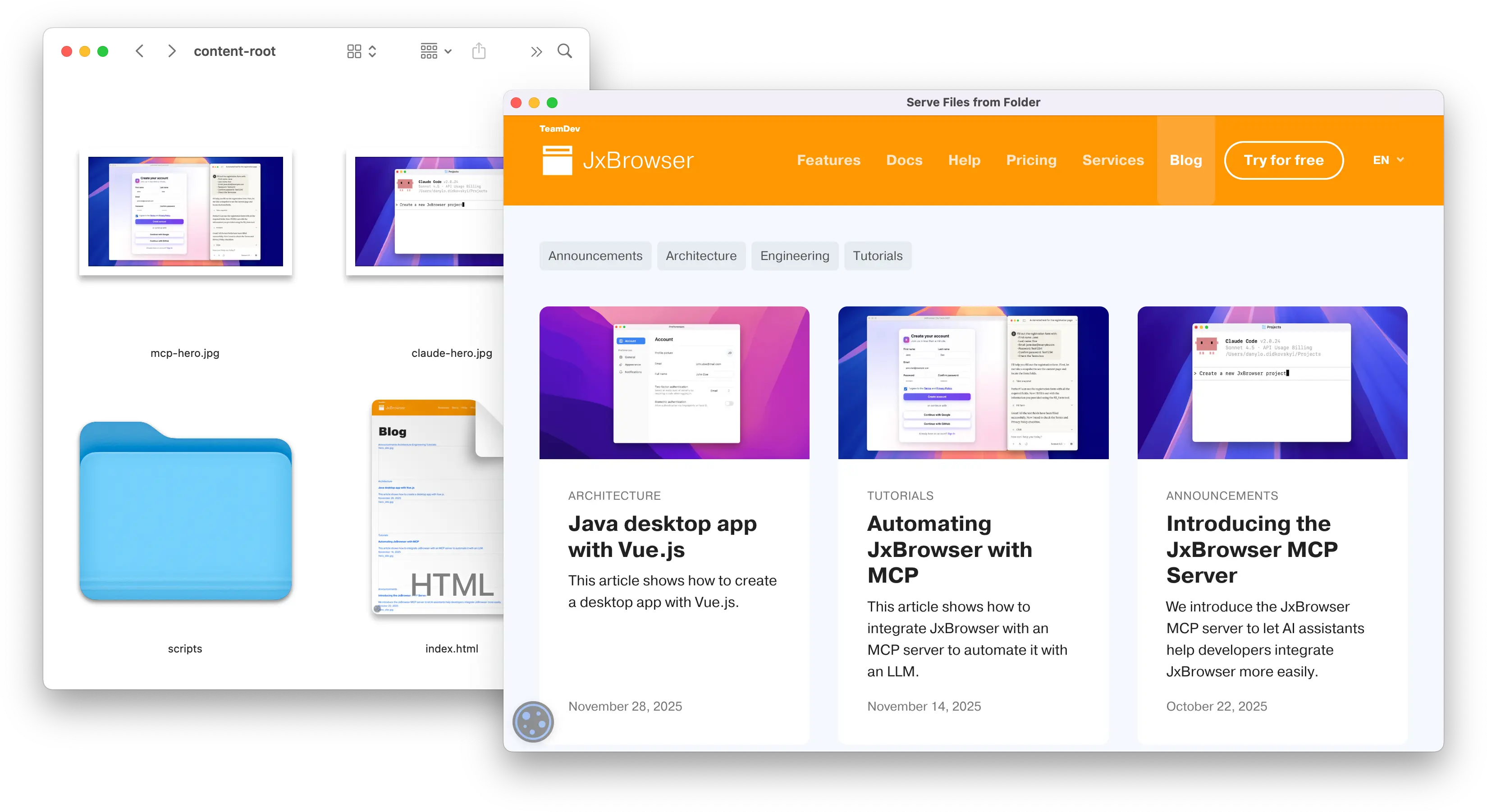
A web page served from the local folder using a request interceptor.