

Web technologies let developers reuse JavaScript skills and code in desktop applications. Electron and MōBrowser can both support secure applications, but they divide security responsibility differently.
Start with an uncomfortable assumption:
Compromised JavaScript has reached your desktop application.
It could reach the operating system next.
Three questions reveal the difference:
- What can the JavaScript reach?
- What safeguards does the framework have?
- How does security hold up over time?
What can JavaScript reach?
In a normal browser, page code runs inside a sandbox. A cross-site scripting bug can expose session data or perform actions as the user, but the browser is designed to keep that code away from the rest of the machine.
A desktop application may need files, native dialogs, the clipboard, system APIs, and background services. If frontend code can reach them directly, an ordinary web bug can give an attacker access to the computer. The desktop framework therefore becomes part of the security boundary.
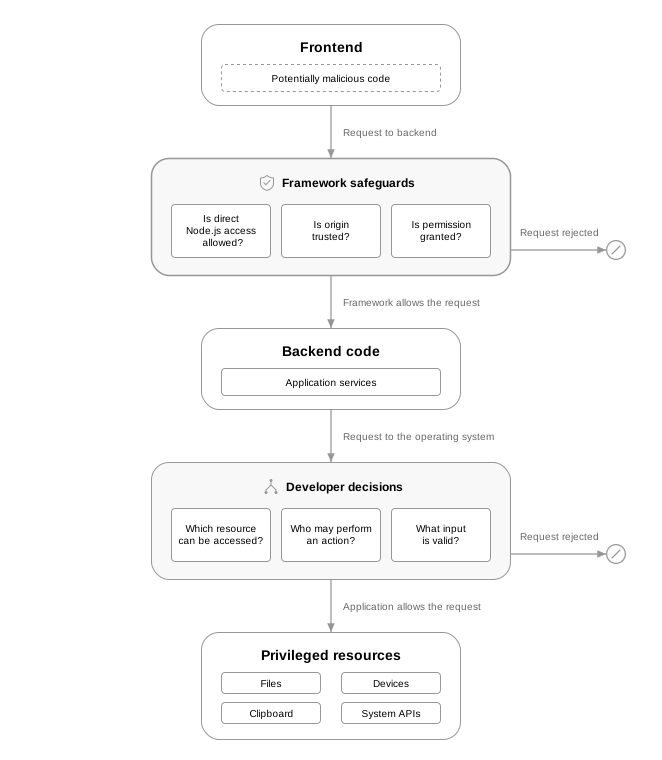
Security model of desktop apps with web frontends.
If malicious JavaScript reaches beyond the application window, it may steal data, access files, call operating system APIs, or execute commands. Several threats can lead to those same outcomes. The first three show how malicious JavaScript can run in the window. The fourth shows how it can cross from the window to the operating system.
Different frameworks handle these threats in different ways. Some give developers settings they must configure and maintain. Others build more restrictions into the platform itself. Both approaches can produce secure applications; the difference is how much responsibility remains with the development team.
Threat: cross-site scripting
An attacker can exploit a bug in a page to run malicious JavaScript in the application window. The code can then steal data shown there or call any application service available to it.
Threat: compromised dependency
A compromised frontend dependency runs with the same browser-level access as other code in the window.
Threat: malicious remote content
When the application loads a remote page, code from that site runs in the application window. It may request device permissions, navigate to other sites, or try to call inter-process communication (IPC) services.
Threat: inter-process communication breach
Malicious JavaScript does not need direct operating system access if it can persuade privileged application code to act for it. A broad IPC operation can expose files, processes, or other operating system features.
These risks show which safeguards a security review should examine. The next section compares how Electron and MōBrowser provide them.
What safeguards does the framework have?
Electron’s security checklist asks developers to configure and review these protections. MōBrowser builds more of them into the application platform itself. The difference is clearest in five safeguards.
Isolating JavaScript from the operating system
Electron: Electron provides secure defaults for Node.js integration, context isolation, and renderer sandboxing, but applications can override them. Developers must review any overrides as the application changes to ensure they do not weaken these protections.
MōBrowser: Frontend JavaScript has no direct access to Node.js.
Limiting access to desktop features
Electron: Developers define a preload script that exposes selected privileged operations to frontend code, then validate callers and input for each operation.
MōBrowser: Developers decide which operations the main process exposes through IPC, while MōBrowser accepts calls only from the bundled frontend or from configured trusted origins.
Restricting navigation to trusted pages
Electron: Developers restrict navigation, new windows, and remote content in application code.
MōBrowser: Untrusted top-level navigation is blocked by default. Developers can override individual navigations without granting the destination IPC access or automatic permission grants.
Denying website permissions by default
Electron: Developers install handlers that decide which permission requests to allow. Without a handler, requests are approved by default.
MōBrowser: External websites receive no access to camera, microphone, geolocation, or notifications by default. Developers grant exceptions when the application needs them.
Verifying app integrity
Electron: ASAR integrity is opt-in and detects
changes to app.asar. Developers configure code signing separately so
the operating system can verify the application’s publisher.
MōBrowser: App integrity automatically
verifies app.bin before loading any sources. A signed application on
macOS or Windows refuses to start if app.bin has been modified after signing.
Linux and unsigned builds use a SHA-256 checksum that detects corruption,
but not deliberate modification.
Shared responsibility
The framework cannot decide what the application needs. Developers still choose which desktop actions JavaScript may request, which sites to trust, and which permissions to grant. They must also verify who may perform each action, reject invalid input, protect sensitive files, and keep secrets out of shipped code.
The framework must enforce safeguards. Developers decide the rest.
That responsibility includes keeping IPC services narrow. A service that reads any file path is dangerous even when only trusted pages can call it. The backend still needs authorization, input validation, tests, and logs for the actions that matter.
How to maintain security over time?
After release, the application, its framework, its dependencies, and their dependencies continue to change. New vulnerabilities can appear in any of them.
When AI produces code faster than people can review it, changes that affect security may receive less attention. Defaults built into the framework reduce the number of settings reviewers need to check, but they do not replace code review.
Reviewers can inspect explicit permission grants instead of searching for missing denial handlers. They can review trusted origins instead of checking every page that might reach IPC. Review, tests, threat modeling, and dependency checks are still necessary, but framework defaults reduce the risk of configuration mistakes.
Security also depends on how the vendor maintains and supports the framework runtime shipped with the application. A review should establish:
- What is shipped. Which third-party components are included, and which software bill of materials (SBOM) formats are available?
- How updates arrive. How quickly are Chromium, Node.js, framework, and packaging vulnerabilities assessed and fixed?
- How incidents are reported. Where are vulnerabilities submitted, and how are customers told about them?
- What help is available. Are advisories, patched builds, migration guidance, and support available for deployed applications?
Framework selection checklist
When assessing a framework, ask yourself the following questions:
- What can compromised JavaScript reach?
- Which safeguards does the framework have?
- How does the framework restrict untrusted pages?
- How does the framework verify installed application sources?
- Can the framework generate an SBOM?
- How quickly are vulnerabilities patched?
- How are customers notified about vulnerabilities?
- What remains the developers’ responsibility?
The last question keeps the review honest. A framework can block risky access by default, but the application still chooses which sites to trust, which services to expose, and how deployed versions are updated.
Conclusion
If malicious code reaches the UI, the decisive question is how many other mistakes must occur before it reaches the machine. Framework defaults can stop that path early and give a frontend bug a smaller blast radius. Developers and framework vendors remain responsible for keeping it that way.
Try MōBrowser, a hardened framework from a CRA-compliant vendor, built to help you stay secure and compliant.