

When a team ships a desktop app built with JavaScript or TypeScript, it often ships more than just the user interface. The bundle may contain business rules, licensing checks, configuration, offline workflows, and integration logic.
In a typical web application, much of that logic can stay on the server. In a desktop app, at least part of it often ends up on the user’s machine, where it can be inspected, patched, or repackaged.
In this article, I want to look at why this problem is hard to avoid, what “source code protection” actually means in practice, and how Electron, Tauri, and MōBrowser approach it today.
Why source code protection matters
For commercial desktop software, the concern is usually not limited to someone reading a few source files out of curiosity. Teams worry about several things at once:
- exposure of proprietary logic
- analysis of licensing and validation flows
- tampering with application behavior
- repackaging of modified builds
- extraction of configuration or integration details
JavaScript makes this concern sharper, because shipped code is often much closer to the original source than native machine code. That does not mean native apps are immune to reverse engineering. It means JavaScript desktop apps often start from a weaker position if the goal is to hide implementation details.
Before comparing frameworks, it helps to separate several very different ideas that are often grouped together under the phrase “source code protection”.
What “source code protection” means
In practice, teams usually need some combination of five things:
- Packaging. Put application files into a bundle or archive.
- Obfuscation. Make code harder to read.
- Transformation. Use bytecode or encryption-like mechanisms to make casual extraction harder.
- Integrity. Detect that packaged files have been modified.
- Architecture. Keep the most sensitive logic out of exposed JavaScript in the first place.
These layers solve different problems. Packaging is not the same as protection. Code signing is not the same as encryption. Obfuscation is not the same as tamper resistance. When these ideas get mixed together, teams often think they have stronger protection than they really do.
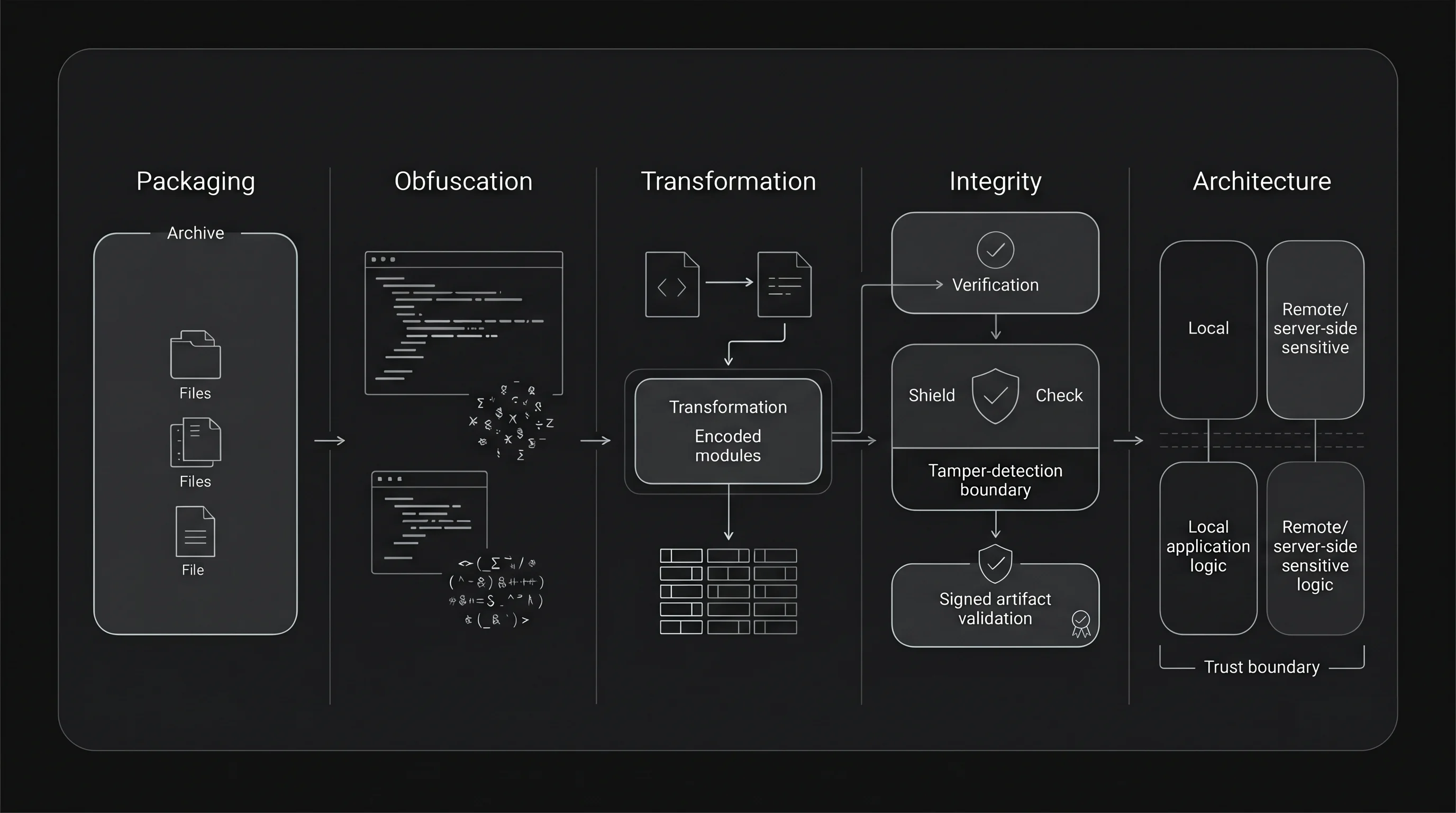
Protection layers solve different problems.
Why this is hard
There is a structural reason why this problem never fully goes away. The application must run on the user’s machine, and the runtime must eventually get some usable form of the code or assets. A determined attacker can study files on disk, instrument the runtime, inspect memory, or patch the app binary.
That is why strong, absolute secrecy is the wrong target for most client-side JavaScript applications. A more realistic target is to raise the cost of inspection and tampering, reduce the number of easy attack paths, and move the most sensitive logic somewhere less exposed.
This is also why “just obfuscate it” is rarely a satisfying answer. Obfuscation can help against casual inspection, but it does not change the fact that the code still has to execute locally.
Source code protection in Electron
Electron makes the problem easy to see, because its default packaging format, ASAR, is explicitly about packaging, not secrecy. The archive format is public, standard tools can extract it, and JavaScript files remain readable after extraction.
That does not mean Electron developers have no defensive tools. In practice, teams layer several mechanisms:
- ASAR packaging to bundle files into
app.asar. - V8 bytecode to make parts of the JavaScript code harder to read.
- ASAR integrity to detect modification of the packaged archive at runtime.
- Code signing so operating systems can verify the app’s origin.
These mechanisms help, but each solves a narrower problem than the phrase “source code protection” suggests.
Bytecode is the closest thing to code hiding in the common Electron toolchain.
For example, electron-vite can compile the main process and preload
scripts to V8 bytecode in production. At the same time, its own documentation
is careful about the limits: the feature does not cover everything, it has
compatibility constraints, and sensitive strings need additional
handling.
ASAR integrity solves a different problem. Electron can validate the integrity
metadata of app.asar at runtime and terminate the app when validation
fails. That is useful for tamper detection, but
it does not make the code unreadable.
Code signing solves yet another problem. It helps operating systems and users trust that the distributed binary came from the expected publisher. It does not hide JavaScript source code inside the bundle.
So the practical Electron answer today is layered hardening, not a single
built-in protection model. It can raise the bar, especially for the main and
preload parts of the app, but it does not turn shipped JavaScript into a
sealed artifact.
Source code protection in Tauri
Tauri approaches the problem from a different direction. Instead of shipping a bundled Chromium runtime, it relies on the system WebView and focuses its security model on trust boundaries between the frontend and the privileged core.
That security model has several important pieces:
- the frontend runs in the WebView and is treated as a less trusted boundary
- access to privileged commands is controlled through capabilities
- communication goes through an IPC layer based on message passing
- Content Security Policy can reduce the impact of script injection and unwanted resource loading.
This is a meaningful security posture, but it answers a slightly different question. Tauri’s public security guidance is mainly about restricting what the frontend is allowed to do and keeping privileged logic in Rust. It does not present frontend source code hiding as a built-in protection feature.
That distinction matters. If your sensitive logic can move from the web layer into Rust commands, Tauri gives you a clearer boundary. If your product still ships a significant amount of valuable frontend logic as web assets, that frontend code remains a client-side artifact and should not be treated as secret just because the overall framework has a strong security story.
In other words, Tauri’s strongest answer is architectural. It helps most when teams can reduce how much high-value logic remains in the frontend at all.
App integrity in MōBrowser
During the build, MōBrowser packs compiled application sources and assets into
a single app.bin file. At runtime, the
application reads these files from app.bin in memory. Any code shipped to the
user’s machine can ultimately be inspected, so secrets and sensitive logic
should stay on a server.
MōBrowser verifies app.bin before loading any sources. A signed
application on macOS or Windows refuses to start if the file has been modified
after signing. Linux and unsigned builds use a SHA-256 checksum that detects
corruption, but not deliberate modification.
MōBrowser also gives teams another architectural option. If some part of the logic is too sensitive or too platform-specific to leave in TypeScript, the app can use a native module written in C++ or Rust and shipped in compiled form. This moves selected logic out of JavaScript, but compiled code can still be reverse engineered.
Files that must remain accessible on the file system go in the resources
directory, outside app.bin. The macOS bundle signature covers these files,
but the MōBrowser runtime does not verify them on Windows or Linux. Do not store
secrets or sensitive logic anywhere in the application bundle.
What developers should pay attention to
The framework choice matters, but architecture still matters more. A few rules stay true across all three options.
Do not treat frontend JavaScript as a safe place for secrets. API keys, licensing decisions, anti-tamper rules, and other high-value checks should stay on a backend or move into a less exposed boundary whenever possible.
Do not confuse packaging with protection. A single archive may make deployment cleaner, but it does not automatically make the contents secret.
Do not confuse signing with secrecy. Signing is still important, because it helps with trust, distribution, and integrity, but it does not make extracted code unreadable.
Use the framework’s actual strength. In Electron, that usually means combining hardening techniques instead of relying on ASAR. In Tauri, it means taking the trust boundary seriously and moving sensitive logic into Rust. In MōBrowser, it means signing applications distributed on macOS and Windows so the runtime can verify their integrity.
Most important, decide what you are defending against. Casual inspection, competitor curiosity, patching by power users, and determined reverse engineering are not the same threat model. A tool that is reasonable for the first two may be weak for the last one.
Conclusion
Source code protection in JavaScript desktop apps is not a yes-or-no property. It is a mix of packaging, obscurity, integrity, and architecture.
Electron gives you a flexible ecosystem and several hardening techniques, but
you have to compose them yourself, and ASAR alone is not protection. Tauri
improves the security story mainly through trust boundaries and Rust-side
privileged logic, not through built-in protection of shipped frontend assets.
MōBrowser packages sources and assets into app.bin and verifies the file
before loading it.
That still does not change the deepest constraint: code that must execute on the client can only be protected up to a point. The practical question is how much effort extraction and tampering should require, and how much sensitive logic you can avoid shipping as JavaScript at all.