

Desktop apps often do heavy work, such as decoding images or searching through files. The faster this work runs, the less users wait. For this kind of work, many developers turn to native code written in C++ or Rust.
Rust compiles to optimized native code and runs heavy work about as fast as C++. It also adds a few guarantees and tools on top:
- Memory safety without a garbage collector.
- Data races caught at compile time.
- Cargo and crates.io for dependencies.
In this article, we look at how a Rust module fits into a desktop app built with web technologies, build a small example, and compare Rust with C++ for this job.
How Rust native modules work in MōBrowser
MōBrowser is a framework for building cross-platform desktop apps with web technologies, and it now supports native modules written in Rust.
A MōBrowser app has a main process written in TypeScript and a web UI. It can also have a native module for heavy work or for direct access to the OS.
The main process and the native module talk through services that you
define in Protobuf .proto files. MōBrowser gives both sides typed APIs for
these services, so TypeScript can call Rust, and Rust can call TypeScript.
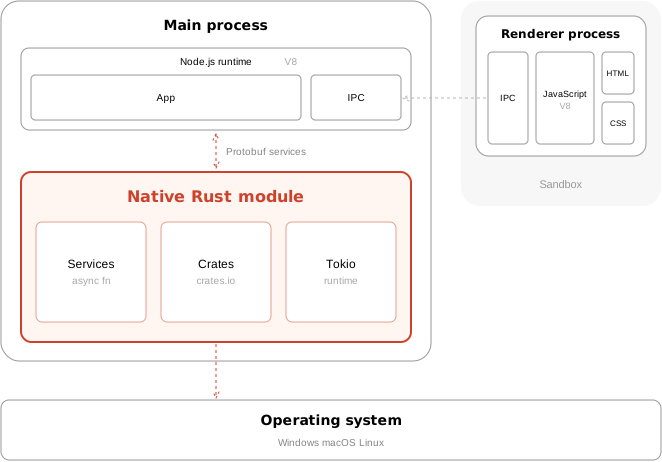
The architecture of a MōBrowser app with a native Rust module.
The TypeScript side is the same whether the module is in Rust or C++. You can switch the native side without touching the code that calls it.
The Rust native module guide covers the API in detail.
Getting started
To create an app with a Rust module, run:
npm create mobrowser-app@latest -- --native rust
To add a Rust module to an existing app, run:
npm run add -- native --lang rust
For the tools you need on each platform, see the prerequisites in the guide.
Rust in a real-world app
To see what Rust brings to a desktop app, let’s take a typical operation in a photo gallery: making thumbnails for a folder of photos.
A photo app opens a folder, and Rust makes the thumbnails. It decodes the photos on all CPU cores and sends each thumbnail to TypeScript as soon as it’s ready, so the gallery fills in while the rest are still decoding.
The two services go in src/native/proto/gallery.proto. Rust implements
the first one, and TypeScript implements the second:
syntax = "proto3";

import "google/protobuf/empty.proto";

message ThumbnailRequest {
  repeated string paths = 1;  // The photos to show.
  uint32 size = 2;            // The longest side of a thumbnail, in pixels.
}

message ThumbnailSummary {
  uint32 created = 1;
  repeated string failed = 2;  // The files that couldn't be decoded.
}

// Implemented in Rust.
service ThumbnailService {
  rpc MakeThumbnails(ThumbnailRequest) returns (ThumbnailSummary);
}

message Thumbnail {
  string path = 1;
  bytes jpeg = 2;
}

// Implemented in TypeScript.
service GalleryService {
  rpc Add(Thumbnail) returns (google.protobuf.Empty);
}
The image crate decodes and resizes the photos, and rayon spreads
the work across CPU cores. Adding them to Cargo.toml takes two lines:
[dependencies]
image = "0.25"
rayon = "1"
Here is the whole module, src/native/lib.rs:
pub mod proto {
    mobrowser::include_proto!();
}

use std::io::Cursor;

use image::ImageFormat;
use proto::{
    Thumbnail, ThumbnailRequest, ThumbnailService, ThumbnailServiceServer,
    ThumbnailSummary,
};
use rayon::prelude::*;

struct Thumbnailer;

impl ThumbnailService for Thumbnailer {
    async fn make_thumbnails(
        &self,
        request: ThumbnailRequest,
    ) -> Result<ThumbnailSummary, String> {
        if request.size == 0 {
            return Err("The thumbnail size must be greater than zero".into());
        }
        // Decoding images is CPU-bound, so keep it off the async threads.
        mobrowser::tokio::task::spawn_blocking(move || {
            make_thumbnails(&request)
        })
        .await
        .map_err(|error| error.to_string())
    }
}

/// Decodes the photos on all CPU cores and sends each thumbnail to the
/// gallery as soon as it's ready.
fn make_thumbnails(request: &ThumbnailRequest) -> ThumbnailSummary {
    let failed: Vec<String> = request
        .paths
        .par_iter()
        .filter_map(|path| match make_thumbnail(path, request.size) {
            Ok(jpeg) => {
                let thumbnail = Thumbnail {
                    path: path.clone(),
                    jpeg,
                };
                mobrowser::runtime::handle()
                    .spawn(proto::gallery_client::add(&thumbnail));
                None
            }
            // A broken or unsupported file fails alone; the rest go on.
            Err(error) => Some(format!("{path}: {error}")),
        })
        .collect();

    ThumbnailSummary {
        created: (request.paths.len() - failed.len()) as u32,
        failed,
    }
}

fn make_thumbnail(path: &str, size: u32) -> image::ImageResult<Vec<u8>> {
    let thumbnail = image::open(path)?.thumbnail(size, size).into_rgb8();
    let mut jpeg = Vec::new();
    thumbnail.write_to(&mut Cursor::new(&mut jpeg), ImageFormat::Jpeg)?;
    Ok(jpeg)
}

mobrowser::main!(launch);

fn launch() {
    mobrowser::register_service(ThumbnailServiceServer::new(Thumbnailer));
}
A few lines are worth a closer look:
par_iter()makes the loop parallel. Change it toiter(), and the same code runs on one thread.spawn_blockingmoves the decoding off the threads that serve other calls.gallery_client::addis the call from Rust to the TypeScript service.
In src/main/index.ts, the main process implements the gallery
service and calls Rust:
import { native } from './gen/native';
import { GalleryServiceDescriptor } from './gen/native_service';

// Rust sends each thumbnail through this service as soon as it's ready.
native.registerService(GalleryServiceDescriptor, {
  async Add(thumbnail) {
    // Add the thumbnail to the UI.
    return {}
  },
})

// `paths` holds the photos from the folder the user opened.
const summary = await native.thumbnail.MakeThumbnails({ paths, size: 256 })
console.log(`Created ${summary.created} thumbnails`)
for (const failure of summary.failed) {
  console.error(failure)
}
To show the thumbnails, the main process forwards them to the UI through MōBrowser’s regular IPC.
Rust compared with C++
C++ native modules remain fully supported, and the gallery above could be written in C++ as well. The differences are in how much the language and its tooling do for you.
What Rust gives you
Dependencies are one line each. The gallery’s decoders and thread pool
take two lines in Cargo.toml, and any other crate works the same way. In
C++, you find, build, and link each library through CMakeLists.txt.
Async code reads like async code. A C++ service method completes
a Callback, and slow work means starting your own thread. A Rust
method is async fnResult, and calling
TypeScript is an .await. In our informal tests on an M1 Max Mac,
2,000 concurrent calls from TypeScript to Rust completed in 18 ms.
The compiler checks thread safety. In C++, a loop that pushes into a shared vector from several threads compiles, and catching the data race is up to review. In Rust, it doesn’t build:
error[E0596]: cannot borrow `failed` as mutable, as it is a captured variable
in a `Fn` closure
That’s why the gallery collects failures with filter_map. A Mutex
would also work.
Failures stay contained. A panic rejects only the call that caused
it, with panic: <message>image crate forbid unsafe code entirely.
Builds are reproducible. Projects pin the Rust version and commit
Cargo.lock, and production builds use exactly the locked crate versions.
npm run sbom
When C++ fits better
C++ is still the better choice when the module wraps an existing C++ library or a platform SDK that only has a C++ API.
Wrapping up
A Rust native module gives a desktop app the native speed it needs for heavy work. On top of that, Rust rules out memory errors, the compiler catches data races, and a panic fails only one call instead of the whole app. Adding a library takes one line, and builds are reproducible.
To try it, create an app with a Rust module:
npm create mobrowser-app@latest -- --native rust
The Rust native module guide covers the API and the project layout.