
Every time an application downloads an update from cloud storage, the owner of the storage usually pays for the traffic. That’s expected when the download goes to one of your users. It’s less welcome when it goes to a crawler.
Starting with MōBrowser 2.17, your application can send HTTP headers, such as
an Authorization token, with its update requests. Your update server can
check them and turn everyone else away.
Paying for strangers
A MōBrowser update server hosts the files that
npm run packreleases.win.json.
The packages, .nupkg files, contain the new versions themselves.
A full package carries the entire application, so it’s the large
part. A delta package carries only the changes since the previous
version.
Many cloud providers charge for traffic that leaves their network. On Amazon S3, for example, it costs $0.09 per GB in the US East (N. Virginia) region, after the first 100 GB a month, which AWS gives free across all its services. See Amazon S3 pricing for current rates.
A public URL draws downloads from far more than your users. Crawlers fetch what they find, mirror sites copy installers, people link straight to a package, and a misconfigured script can download the same file in a loop.
Here’s how that adds up. Say a full package is 150 MB and the server sees 10,000 unwanted downloads a month. That’s about 1.5 TB of traffic, or roughly $125 a month at the S3 rate above, for downloads that never reach a user.
The obvious fix
The first fix that comes to mind is to make the update server private. That stops the strangers, and it stops your own installed applications too. Before 2.17, a MōBrowser application couldn’t attach credentials to its update requests, so a private server refused them like any other anonymous request.
The remaining workaround was a long URL that’s hard to guess. It kept the server out of sight, but anyone who found the URL, in a network log or inside the application bundle, could download from it as freely as before.
How headers work
MōBrowser 2.17 lets the application attach credentials to its update requests. You specify HTTP headers, and the application sends them with the feed request and with every package download from the same origin as the update server. On the other end, your server checks the headers and refuses requests without them. The “Shared token” section below shows a minimal one.
A few rules apply to these headers:
- Same origin only. The application downloads packages from another origin without the headers, and a redirect to another origin drops them.
- HTTPS only. The update server must use HTTPS. Plain HTTP works only
for
localhostduring development. - Kept out of logs. Header values and URL query strings never appear in update logs or error messages.
- Transport headers are reserved. Headers that the HTTP client sets
itself, such as
HostandUser-Agent - macOS and Windows. Automatic updates, and with them update headers, are available on macOS and Windows.
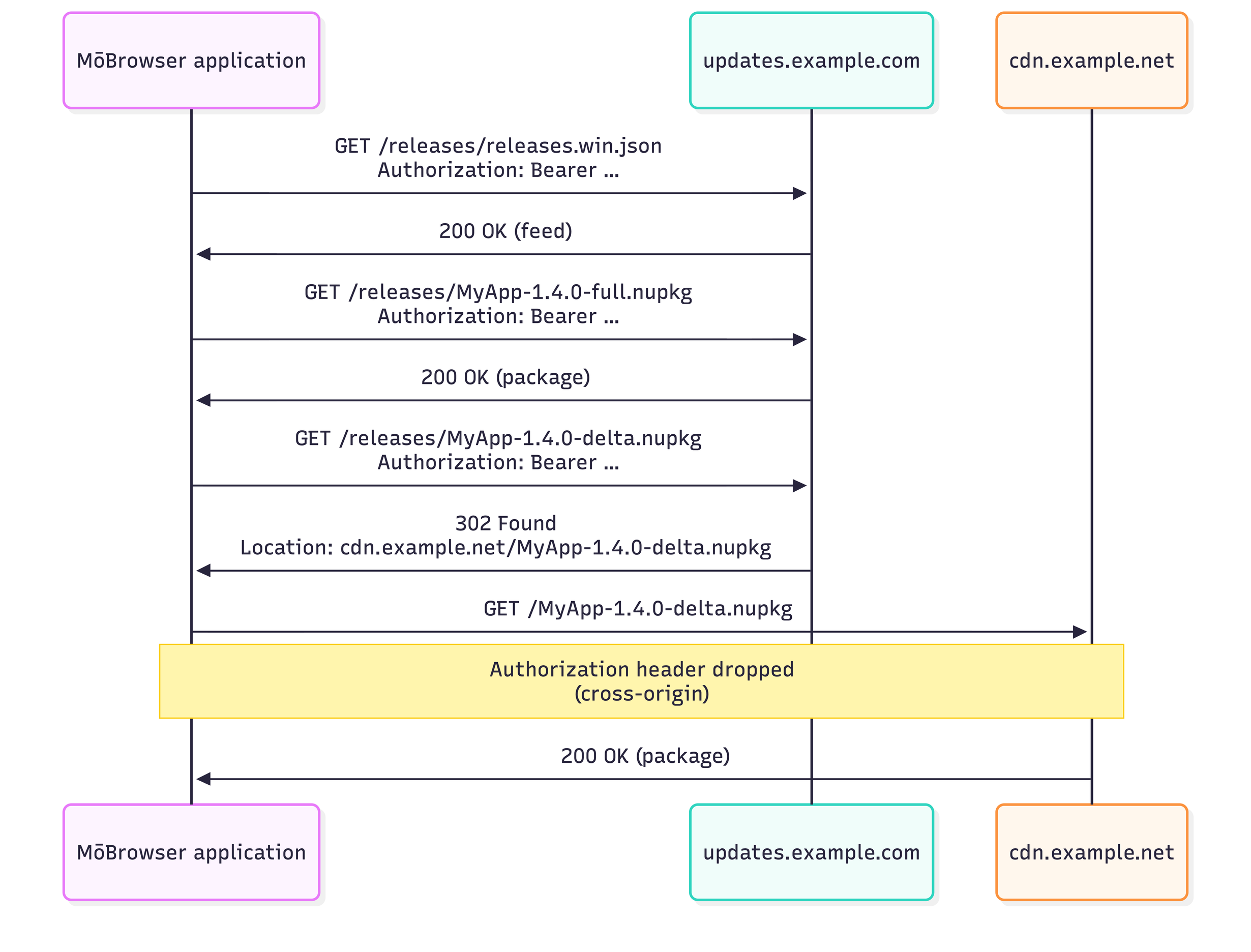
Which update requests carry the header.
Authentication adds to the update protections
MōBrowser already has. Updates are verified as before. Once you’ve generated
an Ed25519 signing key, npm run pack
Authentication decides who can download a package. Signing decides whether the application installs it.
You can specify the headers in two places: in mobrowser.conf.json for
the built-in Check for Updates… menu item, or in code for
an update flow you write yourself. The configuration file is
the shorter path.
Shared token
If the application uses the built-in Check for Updates… menu item,
add updateServerHeaders next to updateServerUrl in mobrowser.conf.json:
{
  "app": {
    "updateServerUrl": "https://updates.example.com/releases/",
    "updateServerHeaders": {
      "Authorization": "Bearer ${UPDATE_TOKEN}"
    }
  }
}
${UPDATE_TOKEN} is a placeholder. A production build replaces it
with the value of the UPDATE_TOKEN environment variable and fails if
the variable isn’t set. The token stays out of the repository,
and a build can’t ship without it.
In CI, the value comes from a secret store. Here’s how that looks in GitHub Actions:
- name: Build and pack
  run: npm run build && npm run pack
  env:
    UPDATE_TOKEN: ${{ secrets.UPDATE_TOKEN }}
Nothing else changes in the application. Check for Updates… and its dialogs work as before, and every request they send to your update server carries the header.
The header check has to happen in front of the update files, before
any traffic is billed. That can be a server you run, or a CDN or proxy
that requires a token. Here’s a minimal server built on node:http,
with no dependencies. It serves the update files and answers 401 to every
request without the right token:
// server.mjs
import { createServer } from 'node:http'
import { createReadStream, statSync } from 'node:fs'
import { timingSafeEqual } from 'node:crypto'
import path from 'node:path'

const TOKEN = process.env.UPDATE_TOKEN
if (!TOKEN) {
  console.error('UPDATE_TOKEN is not set.')
  process.exit(1)
}
const EXPECTED = Buffer.from(`Bearer ${TOKEN}`)
const RELEASES_DIR = path.resolve(process.env.RELEASES_DIR ?? './releases')
const UPDATE_FILE = /^releases\.[\w-]+\.json$|\.nupkg$/

function authorized(req) {
  const given = Buffer.from(req.headers.authorization ?? '')
  return given.length === EXPECTED.length && timingSafeEqual(given, EXPECTED)
}

createServer((req, res) => {
  if (!authorized(req)) {
    res.writeHead(401, { 'WWW-Authenticate': 'Bearer' }).end()
    return
  }
  // Serve plain file names from RELEASES_DIR and nothing else.
  const name = path.basename(new URL(req.url, 'http://localhost').pathname)
  const file = path.join(RELEASES_DIR, name)
  const stat = statSync(file, { throwIfNoEntry: false })
  if (!UPDATE_FILE.test(name) || !stat?.isFile()) {
    res.writeHead(404).end()
    return
  }
  const type = name.endsWith('.json')
    ? 'application/json'
    : 'application/octet-stream'
  res.writeHead(200, {
    'Content-Length': stat.size,
    'Content-Type': type,
    'Cache-Control': 'no-store',
  })
  createReadStream(file).pipe(res)
}).listen(8080)
A few lines do the security work:
- No token, no server. The server refuses to start without a token, so it can’t accept an empty one by accident.
- Constant-time comparison.
timingSafeEqual()compares the tokens in constant time, so response timing doesn’t reveal how much of a guess was correct. - Base names only. Taking only the base name of the path keeps
requests inside
RELEASES_DIR.
To try it, save server.mjs in your application’s project root and start it
there, with RELEASES_DIR pointing at the output of
npm run pack
UPDATE_TOKEN=dev-token RELEASES_DIR=build/dist/win-x64/pack node server.mjs
The server keeps running. In a second terminal, send two requests, one without the token and one with it:
curl -i http://localhost:8080/releases.win.json
# HTTP/1.1 401 Unauthorized

curl -i -H 'Authorization: Bearer dev-token' \
  http://localhost:8080/releases.win.json
# HTTP/1.1 200 OK
To check the whole flow, set updateServerUrl to http://localhost:8080/,
build the application with UPDATE_TOKEN=dev-token
What tokens stop
For the bill, a shared token is enough. A crawler, a mirror site, or a script stuck in a loop doesn’t have it, so each one gets a 401 response instead of a 150 MB package.
The token has a weakness, though. The configuration file ships inside the application bundle, and the token ships with it in plain text. Every installation has the same token, and anyone who unpacks the application can read it. It keeps out anonymous traffic, not someone who digs into your application on purpose.
A shared token also has two limits:
- It doesn’t identify the user. Every installation sends the same value, so the server can’t give one customer a different feed.
- It can’t be revoked for one installation. To rotate it, you ship
a build with a new token. Until older installations update,
the server accepts both tokens. In the server above, that means
a second
EXPECTEDbuffer.
Because the token is public in practice, make sure it grants read access to the update files and nothing else. A cloud access key that can also write to your storage doesn’t belong in the bundle.
When the server needs to know who is asking, or to cut off one customer, the token has to come from somewhere other than the bundle.
Per-user tokens
An update flow you write yourself passes headers to app.checkForUpdate()
directly. The application gets the token at runtime, for example after
the user signs in, so the build ships without one. This replaces
the built-in Check for Updates… dialogs with your own code:
import { app } from '@mobrowser/api'
import { getAccessToken } from './auth'

const UPDATE_SERVER = 'https://updates.example.com/releases/'

export async function checkForUpdates(): Promise<void> {
  // A short-lived token for the signed-in user.
  const token = await getAccessToken()
  const result = await app.checkForUpdate(UPDATE_SERVER, {
    headers: { Authorization: `Bearer ${token}` },
  })
  if (!result) {
    // The application is up to date.
    return
  }
  if (typeof result === 'string') {
    console.error(`Update check failed: ${result}`)
    return
  }
  // The download sends the same headers as the check.
  const download = await result.download()
  if (download.success) {
    app.restart()
  } else {
    console.error(`Update download failed: ${download.error}`)
  }
}
getAccessToken() is a placeholder for your own code that returns
the current user’s token, such as one from your sign-in session or
a licensing service.
A few details are easy to miss:
- Only your headers are sent.
app.checkForUpdate()ignoresupdateServerHeaders, which belongs to the built-in flow. - Invalid headers throw. A reserved header, or an invalid header
name or value, throws a
TypeError. It’s a bug to fix, not an error to handle like a failed network request. - Tokens can expire before the download. The download reuses
the headers from
app.checkForUpdate(), so get a fresh token right before the check. If the download fails because the token expired, check for updates again with a new token.
Because each request carries the user’s own token, the server can do more than let it through. It verifies the token, checking its signature and expiry, and answers 401 if the token isn’t valid. When the token is valid but the user isn’t entitled to updates, as with a revoked license, it answers 403. It can also return a different feed for different customers, such as early-access builds for some and delayed releases for others.
Wrapping up
Before 2.17, a MōBrowser update server had to be open to anyone, and on
metered hosting, you paid for every download, whoever made it. Now a shared
token in mobrowser.conf.json turns strangers away, and a token passed to
app.checkForUpdate() lets the server tell one user from another. Package
signing works as before, and for a shared token, the only changes are
one configuration key and one environment variable.
For the details, see the automatic updates guide and the MōBrowser 2.17 release notes.
If you build something on top of it, such as per-customer feeds, staged rollouts, or licensing-aware updates, we’d like to hear about it.