Context Menu
How to create and show a native context menu in the app window.
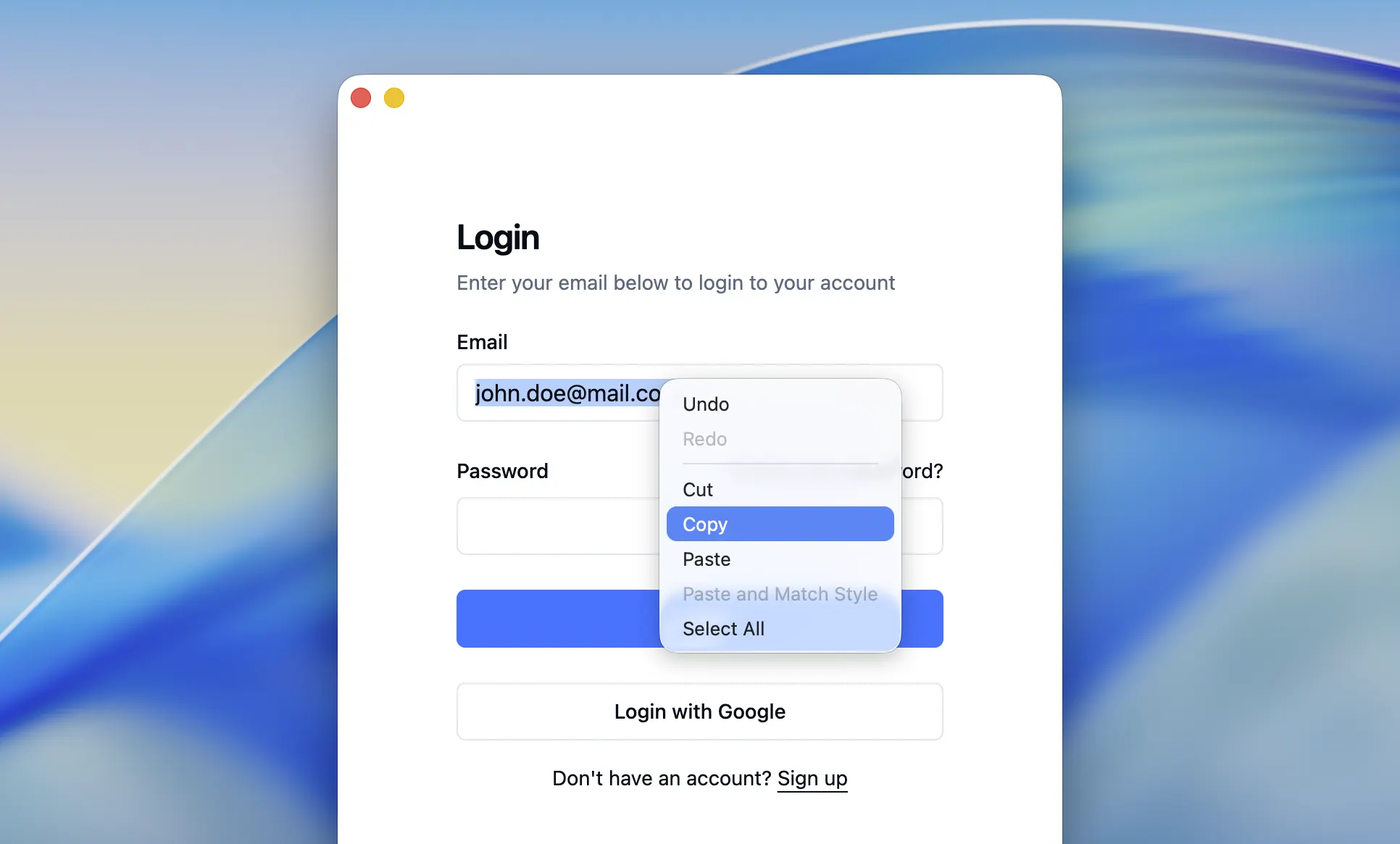
Context menu is a popup menu that appears when a user right-clicks on an element (link, image, selected text, input field, etc.) in the browser window.
No context menu will appear by default when a user right-clicks on the browser window. You can change the default behavior and display a custom native context menu with the items you need or suppress the context menu completely.
Creating a context menu
When a context menu is requested, the 'showContextMenu' handler is invoked. You can register your own handler implementation where you can create a context menu with the necessary items and show it:
import {
  app,
  BrowserWindow,
  ContextMenu,
  ContextMenuItem,
  CheckboxContextMenuItem,
  ShowContextMenuParams
} from '@mobrowser/api';

const win = new BrowserWindow()
win.browser.handle('showContextMenu', (params: ShowContextMenuParams) => {
  // Display a custom context menu when the user right-clicks on a page.
  if (params.contentType === 'page') {
    return new ContextMenu({
      items: [
        'goBack',
        'goForward',
        'separator',
        new ContextMenu({
          label: 'Custom Menu',
          items: [
            new ContextMenuItem({
              label: 'Menu Item',
              action: (item: ContextMenuItem) => {
                console.log(`${item.label} clicked`)
              }
            }),
            new CheckboxContextMenuItem({
              label: 'Checkbox Menu Item',
              checked: true,
              action: (item: CheckboxContextMenuItem) => {
                console.log(`${item.label} clicked`)
              }
            })
          ]
        })
      ]
    })
  }
  // Otherwise, suppress and do not show any context menu.
  return 'suppress'
})
The params.contentType property provides the information about the element that was right-clicked on. User can
right-click on a link, image, text, video, audio, etc. You can use this information to create and show a different
context menu for different elements. Here’s an example of how to do it:
import {
  ContextMenu,
  ContextMenuElement,
  ContextMenuItemRole,
  ShowContextMenuParams
} from '@mobrowser/api';

win.browser.handle('showContextMenu', (params: ShowContextMenuParams) => {
  let items: (ContextMenuElement | ContextMenuItemRole)[] = []
  // Add menu items for a page.
  if (params.contentType === 'page') {
    items.push('goBack')
    items.push('goForward')
    items.push('separator')
    items.push('savePageAs')
    items.push('print')
    items.push('separator')
  }

  // Add menu items for a link.
  if (params.contentType === 'link') {
    items.push('saveLinkAs')
    items.push('copyLinkAddress')
    items.push('separator')
  }

  // Add menu items for an image.
  if (params.contentType === 'image') {
    items.push('saveImageAs')
    items.push('copyImageAddress')
    items.push('copyImage')
    items.push('separator')
  }

  // Always add the following menu items.
  items.push('inspectElement')

  return new ContextMenu({ items })
})
Context menu item roles
Here’s a list of the context menu item roles you can use to create the context menu:
| Role Name | Description |
|---|---|
'separator' | A context menu separator. |
'goBack' | The Back menu item. |
'goForward' | The Forward menu item. |
'reload' | The Reload menu item. |
'savePageAs' | The Save Page As… menu item. |
'print' | The Print… menu item. |
'exitFullscreen' | The Exit Fullscreen menu item. |
'saveLinkAs' | The Save Link As… menu item. |
'copyLinkAddress' | The Copy Link Address menu item. |
'copyEmailAddress' | The Copy Email Address menu item. |
context_menu::SaveImageAs() | The Save Image As… menu item. |
'copyImageAddress' | The Copy Image Address menu item. |
'copyImage' | The Copy Image menu item. |
'saveAudioAs' | The Save Audio As… menu item. |
'copyAudioLocation' | The Copy Audio Location menu item. |
'saveVideoAs' | The Save Video As… menu item. |
'copyVideoLocation' | The Copy Video Location menu item. |
'pictureInPicture' | The Picture in Picture menu item. |
'loop' | The Loop menu item. |
'controls' | The Controls menu item. |
'rotateCW' | The RotateCW menu item. |
'rotateCCW' | The RotateCCW menu item. |
'reloadFrame' | The Reload Frame menu item. |
'viewFrameSource' | The View Frame Source menu item. |
'undo' | The Undo menu item. |
'redo' | The Redo menu item. |
'cut' | The Cut menu item. |
'copy' | The Copy menu item. |
'paste' | The Paste menu item. |
'pasteAndMatchStyle' | The Paste and Match Style menu item. |
'selectAll' | The Select All menu item. |
Context menu items
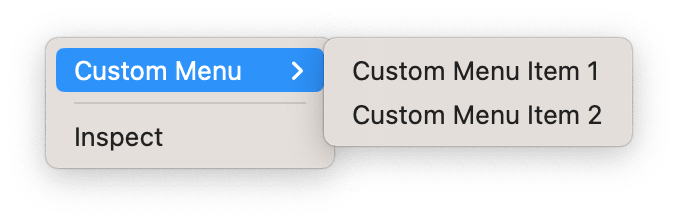
You can create and add a custom menu or menu items to the context menu. Here’s an example of how to do it:
win.browser.handle('showContextMenu', (params: ShowContextMenuParams) => {
  return new ContextMenu({
    items: [
      new ContextMenu({
        label: 'Custom Menu',
        items: [
          new ContextMenuItem({
            label: 'Custom Menu Item 1',
            action: (item: ContextMenuItem) => {
              console.log(`${item.label} clicked`)
            }
          }),
          new ContextMenuItem({
            label: 'Custom Menu Item 2',
            action: (item: ContextMenuItem) => {
              console.log(`${item.label} clicked`)
            }
          })
        ]
      }),
      'separator',
      'inspectElement'
    ]
  })
})
You will see the following context menu when you right-click on the application window:
Suppressing the context menu
You can suppress the context menu by returning the 'suppress' value from the 'showContextMenu' handler.
win.browser.handle('showContextMenu', (params: ShowContextMenuParams) => {
  return 'suppress'
})